Procurement management in a project covers every step a project team takes to obtain goods, services and results from external suppliers: plan, award, control. The PMBOK Guide by the Project Management Institute (PMI) groups this into three processes in its 6th edition. This guide walks through them with an office move in Merlin Project, including a make-or-buy calculation.
What Is Procurement Management in Project Management?
Procurement management is the part of project management that handles everything the project buys from outside: materials, equipment, services and entire deliverables. It defines what you buy, from whom, under which contract and by when each delivery has to arrive in the schedule.
The difference to corporate purchasing lies in the scope. A company's purchasing department buys continuously for operations; project procurement buys once for a project goal with a fixed deadline and budget. In many companies, purchasing negotiates and signs the contract. The project manager supplies the requirement, the statement of work and the dates, and checks whether each delivery fits the plan.
Public buyers must follow procurement law: in the EU the procurement directives, in Germany for example the GWB, the VgV and, for construction, the VOB/A. For project managers, this means tender periods belong in the schedule as activities of their own.
Which Processes Make Up Project Procurement Management?
The 6th edition (2017) of the PMBOK Guide describes three procurement processes: Plan Procurement Management, Conduct Procurements and Control Procurements. PMI dropped the fourth process of the 5th edition, Close Procurements. Since then, Control Procurements and Close Project or Phase cover the formal closing of contracts.
The three procurement processes in PMBOK 6
What each process delivers, using an office move as the example
Process 12.1 · Planning
Plan Procurement Management
Outputs: procurement management plan, make-or-buy decisions, procurement statement of work, bid documents and source selection criteria. In the office move: you buy the moving company and the Wi-Fi hardware, your own team handles the address changes.
Process 12.2 · Executing
Conduct Procurements
Request offers, answer bidder questions, select sellers and sign contracts. Outputs: selected sellers and signed agreements. In the office move: three moving companies bid, one wins the order for 3,000 euros.
Process 12.3 · Monitoring and controlling
Control Procurements
Check deliveries, performance and invoices against the contract, negotiate changes, close contracts formally. Outputs: work performance information, change requests, closed procurements. In the office move: the Wi-Fi hardware arrives three days late, and the project manager checks the effect on moving day.
Source: PMBOK Guide, 6th edition (PMI 2017), knowledge area 12
The 7th edition (2021) replaced the ten knowledge areas with principles and eight performance domains. It covers procurement mainly in the Project Work domain: bid types such as RFI, RFQ and RFP, seller selection and contracting. According to PMI, the 8th edition (November 2025) brings back process guidance and covers procurement in more depth. If you work by processes or prepare for the PMP exam, the three-step model of the 6th edition gives you the clearest structure.
What Goes Into a Procurement Management Plan?
The procurement management plan defines how the project buys. It answers six questions:
- What do you buy? The result of the make-or-buy analysis, one decision per item.
- What exactly must the seller deliver? The procurement statement of work describes scope, quantity, quality and acceptance precisely enough for sellers to quote a binding price. It derives from the project scope.
- How do you select? Weighted selection criteria, for example price 40 percent, delivery date 30 percent, references 30 percent.
- Which contract fits? Fixed price, time and material or cost-reimbursable (see below).
- What must arrive by when? Order dates and lead times, linked to the schedule.
- What can go wrong? Delivery risks with responses, such as a second supplier.
Make or Buy: When Does Buying Pay Off?
A make-or-buy analysis compares the cost of doing the work yourself with a supplier's price and calculates the quantity at which one option beats the other. The break-even formula: fixed costs of making divided by (unit price of buying minus variable unit cost of making).
An example from the office move: in the new building, 40 workstations need network and phone connections. Your own IT team can do it, or a contractor takes it on at a fixed price.
| Item | Make (own IT) | Buy (contractor) |
|---|---|---|
| Fixed costs (cable tester, tools) | €1,200 | €0 |
| Labor per workstation | 1.5 h × €60/h = €90 | included |
| Material per workstation | €15 | included |
| Cost per workstation | €105 | €140 |
| Total for 40 workstations | €1,200 + 40 × €105 = €5,400 | 40 × €140 = €5,600 |
| Internal working time | 60 hours | 0 hours |
On paper, making wins by 200 euros, or 3.6 percent. The example still goes to the contractor. The IT lead is already scheduled for the Wi-Fi installation and the server move in the same week; 60 extra hours would overload him and put moving day at risk. Price alone never settles make or buy: capacity, know-how, schedule risk and quality risk belong in the same calculation.
Which Contract Type Fits the Purchase?
The contract type splits the cost risk between you and the seller. The PMBOK Guide distinguishes three families:
- Fixed-price contract: the seller carries the cost risk. Fits when the statement of work is complete, such as furniture transport.
- Cost-reimbursable contract: you reimburse actual costs plus a fee or incentive. Fits when the scope is unclear, as in research and development.
- Time and material contract: you pay hours and material at fixed rates. Fits small, hard-to-plan jobs.
Variants, worked examples and pitfalls are in the article Contracts in Project Management: Fixed Price, T&M and Cost-Reimbursable.
How Do You Plan and Control Procurement in Merlin Project?
In Merlin Project, you model suppliers as resources, lead times as activities and payments as cost items. The example comes from the office move in the Merlin Project documentation.
1. Create suppliers and material as resources. Merlin Project has four resource types: Person, Company, Equipment and Material. Create the moving company as a Company and the Wi-Fi hardware as Material with a Material Unit and the price per unit as Standard Rate. Merlin Project calculates material costs from quantity and standard rate. The lesson Setting Up Resources shows each step.
2. Plan lead times as activities. The activity "Order Wi-Fi" gets 2 hours of Work and a Duration of 10 edays. The edays unit counts elapsed days including weekends, the way a supplier delivers. "Install Wi-Fi" follows with an End to Start dependency and 1 day of Lead/Lag, and the milestone "Moving day" depends on the installation.
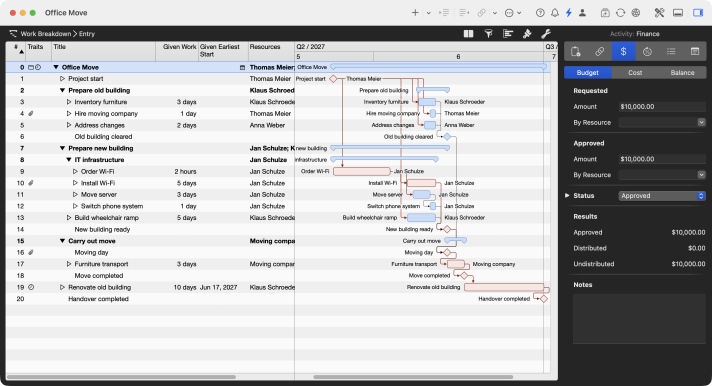
Lead time on the critical path
With View › Show Critical Path, Merlin Project colors the longest chain of dependent activities red. In the office move it starts at “Order Wi-Fi”: every day of delivery delay pushes the June 30 handover. The glossary entry critical path explains how the chain forms.
3. Record contract amounts as costs. Select the activity "Furniture transport" and open the Finance tab › Cost in the Inspector. Click + to add a cost item "Moving company" of 3,000 euros and choose the Accrual, for example Accrue at end. The Status field of a cost item offers stages such as Requested, Approved, Invoice received, Invoice released and Invoice paid. Your plan shows which supplier invoice is still open.
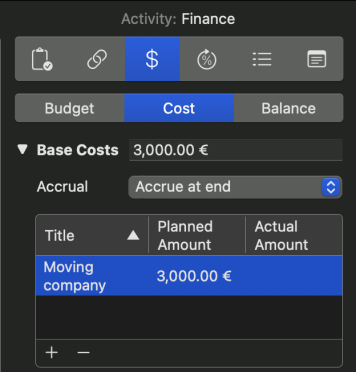
Supplier costs on the activity
The cost item “Moving company” sits directly on the activity “Furniture transport”. Merlin Project rolls it up into the budget of the group and the project. The lesson Setting Up Costs shows how budget, cost and balance work together.
4. Attach delivery risks. Select "Order Wi-Fi" and choose Insert › Attachment › Risk. Enter Probability, Risk Class and, under Actions, the response. The risk attachment is available in Merlin Project, not in Merlin Project Express.
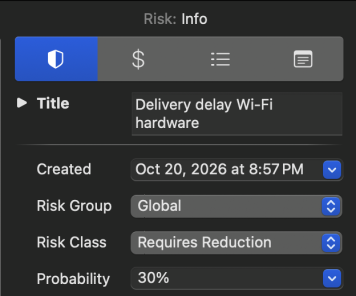
Late delivery as a risk
The risk “Delivery delay Wi-Fi hardware” carries a 30 percent probability and the class Requires Reduction. The action to find an alternative supplier and request a quote sits right on the activity. More in the lesson Risk Management.
5. Control the delivery. If the supplier reports a three-day delay, raise the Duration of "Order Wi-Fi" from 10 to 13 edays. Merlin Project reschedules all successors, and you see at once whether moving day holds. Track the progress of running activities on the Actual Values tab.
Conclusion
Procurement management decides deadlines, because lead times often sit on the critical path. Plan purchases along the three PMBOK processes, calculate make or buy with capacity and risk in mind, and link every order in the schedule to the activity that waits for it.
If you have any questions about this blog article or would like to discuss it, we look forward to your contribution in our forum.
Frequently asked questions
What is the difference between purchasing and project procurement management?
Corporate purchasing buys continuously for operations. Project procurement management buys once for a project goal with a fixed deadline and budget. Purchasing often negotiates the contract, while the project manager supplies the requirement, the statement of work and the dates.
What are the procurement processes in the PMBOK Guide?
The 6th edition lists three: Plan Procurement Management, Conduct Procurements and Control Procurements. PMI dropped the former Close Procurements process. The 7th edition covers procurement in the Project Work performance domain.
What is a procurement statement of work?
The procurement statement of work defines what a seller must deliver: scope, quantity, quality, dates and acceptance criteria. It comes out of Plan Procurement Management and forms the basis for offers and the contract.
How do you calculate a make-or-buy decision?
Divide the fixed costs of making by the difference between the unit price of buying and the variable unit cost of making. The result is the break-even quantity. Example: €1,200 / (€140 − €105) = 34.3, so making is cheaper from 35 units on. Capacity and risk also belong in the decision.
How do I model suppliers in Merlin Project?
Create suppliers as resources of type Company and consumables as type Material with a material unit and standard rate. Plan lead times as activities with a duration in edays, and contract amounts as cost items on the Finance tab › Cost.