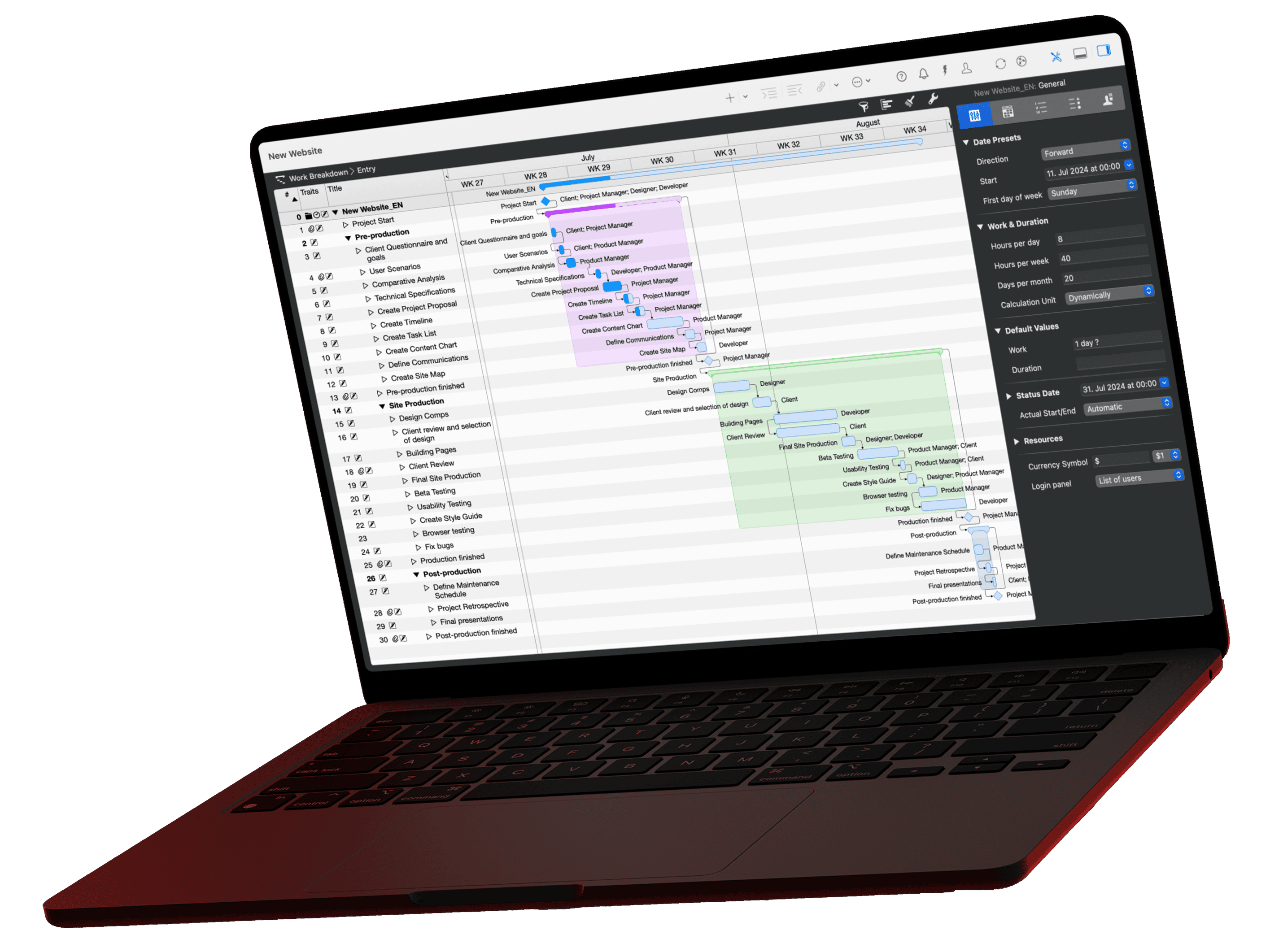
Project time management determines which activities run in which order, for how long and on which dates. The PMBOK Guide of the Project Management Institute describes six processes for it, from planning to control. This guide takes you to a project schedule in six steps, using an office move with a fixed end date in Merlin Project.
What is time management in project management?
Project time management (also schedule management) determines when which work happens in a project. The result is the project schedule: a list of activities with start, end, duration and dependencies, usually shown as a Gantt chart on a time axis.
The PMBOK Guide of the Project Management Institute (PMI) calls this knowledge area "Project Schedule Management" in its 6th edition (2017), formerly "Project Time Management". It covers six processes: Plan Schedule Management, Define Activities, Sequence Activities, Estimate Activity Durations, Develop Schedule and Control Schedule.
Time is one of the three constraints of the triple constraint, together with cost and scope. If you move the deadline, you usually change cost or scope as well.
How do you build a project schedule?
A project schedule in six steps
Office move example, deadline June 30
Define activities
Break the work into activities
Derive the activities from the work breakdown structure and add milestones. In the office move: order Wi-Fi, install Wi-Fi, move servers, furniture transport and more.
Sequence activities
Set dependencies
Link the activities. "Install Wi-Fi" starts one day after "Order Wi-Fi" ends (End to Start with one day of lag).
Estimate durations
Separate work from duration
"Order Wi-Fi" takes 2 hours of work but lasts 10 elapsed days of delivery time. Work ties up resources; duration sets the date.
Set calendars
Enter working times and exceptions
Enter working days, public holidays and company shutdowns. The calendar decides which date five working days end on.
Develop schedule
Check the critical path
Check which chain of activities determines the project end. In the office move, it runs from "Order Wi-Fi" to "Handover completed".
Control schedule
Measure progress against the plan
Record actual starts and progress as of the status date and compare them with the plan. Deal with deviations on the critical path first.
Processes according to the PMBOK Guide, 6th edition (PMI 2017), knowledge area 6
Which dependencies are there in a schedule?
Dependencies define how two activities relate in time. The usual case is End to Start: the successor starts when the predecessor ends. But that is only one of four dependency types:
| Type | Meaning | Example |
|---|---|---|
| End to Start (ES) | B starts after A has ended | Set up server after delivery |
| Start to Start (SS) | B starts after A has started | Documentation starts with testing |
| End to End (EE) | B ends after A has ended | Acceptance ends after the last test |
| Start to End (SE) | B ends after A has started | Old system runs until the new one starts |
A lag on the dependency adds waiting time; a negative lag lets activities overlap. That way, a successor can start before its predecessor ends if the work allows it.
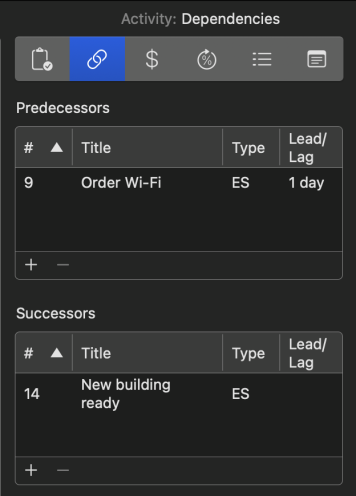
Dependency with lag
The Dependencies tab of the Inspector shows predecessors and successors with Type and Lead/Lag. "Install Wi-Fi" depends on "Order Wi-Fi" with ES and a Lead/Lag of one day and leads to the milestone "New building ready".
Why does the calendar determine the date?
Merlin Project calculates durations in working time unless you explicitly choose elapsed time. A five-day duration across a weekend or a public holiday therefore ends later than five calendar days. Units with a leading "e", such as edays, count continuously, including non-working days. That fits delivery or drying times.
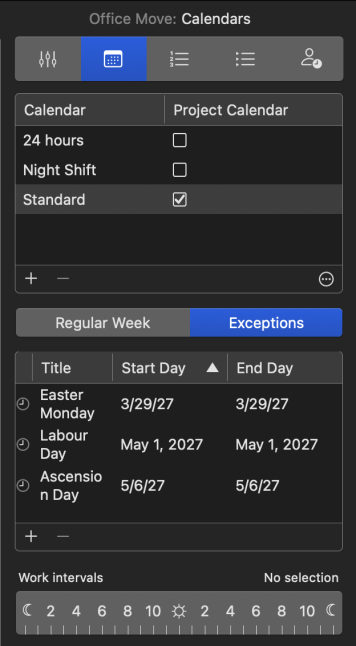
Public holidays as exceptions
Under File › Project Settings › Calendars, set the working days under Regular Week and enter public holidays, vacations and company shutdowns under Exceptions. Merlin Project recalculates all dates right away.
How do you see which dates are critical?
The critical path is the longest chain of dependent activities. Every day of delay on this chain moves the project end. Activities off the critical path have float and may move within it.

In the office move, the Wi-Fi delivery lies on the critical path. If the hardware arrives three days late, the June 30 deadline moves back unless you act, for example by overlapping later activities (fast tracking) or adding resources (crashing).
How do you control the schedule in a running project?
Set a status date, for example the end of the month for the status report, and record actual starts and progress. The Work Breakdown › Progress view in Merlin Project shows every activity with a status icon: on time, slightly behind schedule (up to 10 percent) or behind schedule (more than 10 percent). The lesson Plan Versus Reality shows how to compare planned and actual values.
Time management for project managers
Besides the project schedule, project managers need a plan for their own time. Two methods help: the Eisenhower matrix separates important from urgent, and time blocking reserves fixed blocks in the calendar for focused work. The guide Task Management shows how to prioritize individual tasks in the team.
Conclusion
A reliable schedule comes from four ingredients: activities, dependencies, durations and calendars. Separate work from duration, use the right dependency type and keep an eye on the critical path. The plan then shows you early which delay moves the project end and which doesn't.
You find a short definition in the glossary under time management.
If you have any questions about this blog article or would like to discuss it, we look forward to your contribution in our forum.
Frequently asked questions
What is time management in project management?
Project time management determines which activities run in which order, for how long and on which dates. The result is the project schedule, usually a Gantt chart. The PMBOK Guide calls the knowledge area Project Schedule Management.
What is the difference between work and duration?
Work is the effort resources put in, for example 2 hours for an order. Duration is the time span from start to end, for example 10 days of delivery time. Work drives cost and utilization, duration drives the date.
Does an activity always have to end before the next one starts?
No. That only applies to the End to Start dependency type. With Start to Start, End to End or Start to End, and with a negative lag, activities partly run in parallel.
What are the three constraints of the triple constraint?
Time, cost and scope. If one changes, it usually affects at least one of the other two.