An executive summary is the short section at the start of a business plan, project proposal or status report that gives decision makers the key findings and a clear recommendation. It runs one to two pages, about 5 to 10 percent of the main document. Below you will find the format, a full construction example and free templates for Word, Excel and Merlin Project.
Free templates: You will find the executive summary templates for Word, Excel and Merlin Project at the end of this article.
What Is an Executive Summary?
An executive summary is a standalone short version of a longer document that lets readers make a decision without reading the full text. It comes first and states the goal, the result, the key figures and a recommendation for executives, investors or clients.
The name comes from its audience: executives rarely read every word of a report. Other common terms are management summary and summary for decision makers. They all mean the same thing.
It differs from the abstract of an academic paper in purpose. An abstract orients the reader and is usually shorter. An executive summary replaces the main document for the busy reader; the English Wikipedia article calls it "a document in miniature".
How Long Should an Executive Summary Be?
An executive summary is one to two pages long in practice. The rule of thumb is 5 to 10 percent of the main document; Wikipedia cites this range from university writing guides.
A worked example: your status report has 20 pages. 5 percent gives one page, 10 percent two pages. A 40-page business plan would result in two to four pages; in that case stick to the upper limit of two.
When Do You Need an Executive Summary?
You need an executive summary whenever someone has to decide based on a long document without reading all of it. Typical cases:
- Business plan and funding request of a startup
- Project proposal or business case before the project starts
- Status report to a steering committee or client
- Product launch plan
- Market and research reports, environmental studies, expert opinions
The content changes with the occasion. A business plan convinces investors of the business model; a project status report shows the client whether schedule and budget hold and what needs deciding now.
What Should an Executive Summary Include?
An executive summary follows seven building blocks: introduction, context, offer or progress, figures, environment, conclusion and decisions required. What each block contains depends on the document.

| Building block | Business plan, project proposal | Project status report |
|---|---|---|
| Introduction | Purpose of the document, the venture in one sentence | Overall status (traffic light) and key message |
| Context | Company, founders, team, location | Project, reporting date, report number |
| Offer or progress | Product, service, problem solved | Work completed against plan |
| Figures | 3-year revenue forecast, funding required | Percent complete, cost, dates |
| Environment | Market and competitive analysis | Risks and deviations |
| Conclusion | Why the venture is viable | What the deviation means for the goal |
| Decisions required | Funding of a specific amount | Approvals with deadline and cost |
Introduction: State purpose and result in the first paragraph. After three sentences the reader should know what it is about and whether everything is on track.
Context: In a business plan, introduce company, founders and location. In a report, project name, reporting date and report number are enough.
Offer or progress: Describe the problem you solve or the progress achieved. In a project proposal, state what you want to achieve and what you need for it.
Figures: Put every number in context. "€2.1 million invoiced" says little; "44 percent of the budget at 46 percent complete" shows the trend. Revenue forecast and funding needs belong here in a business plan.
Environment: A business plan answers: who do you compete with, what is your advantage, what risks exist? A status report names the two or three risks that threaten schedule or budget.
Conclusion and decisions required: Sum up the result in one sentence and say what the reader should decide by when. A recommendation without a deadline gets ignored.
Executive Summary Example: Status Report of a Construction Project
The following sample shows a half-page executive summary for the status report of a fictional office building. All figures fit together, and you can reuse the format directly.
Example
Executive Summary: Status Report No. 7, New Office Building Hafenstraße
AmberThe structural shell is complete, two weeks later than planned. Handover on 30 Jun 2027 remains achievable if you approve six Saturday shifts for facade installation by 9 Oct 2026.
46% of the construction work is complete. €2,112,000 has been invoiced, which is 44% of the €4,800,000 budget.
Shell acceptance on 28 Aug instead of 14 Aug 2026: 10 working days of delay due to additional foundation work at axis C. Six Saturday shifts recover 6 working days; the time reserve of 5 working days before handover covers the remaining 4.
The ground conditions change order (€27,600) and the Saturday shifts (€38,400) are charged to the risk reserve. It drops from €96,000 to €30,000; the total budget stays at €4,800,000.
The elevator has a lead time of 26 weeks. Ordered on 30 Oct 2026, it arrives on 30 Apr 2027; installation and inspection take 8 weeks, until 25 Jun 2027. Every week of delay moves the handover.
- Approve six Saturday shifts for the facade (€38,400), deadline 9 Oct 2026.
- Award the elevator contract, deadline 30 Oct 2026.
Fictional sample project. Length: about 170 words, half a letter-size page.
Three things make this example work:
- The result comes first. Anyone who reads only the status and the first paragraph knows the situation and the request.
- Every number has a reference point. Cost sits next to progress, the delay next to the reserve that absorbs it.
- Decisions come with a deadline and a price. The steering committee can approve or reject in a single meeting.
Our article on meeting minutes with example and template shows how to record the approval from this report in the next site meeting.
How to Write an Executive Summary in 5 Steps
You write the executive summary last, once the main document is finished, and then place it at the beginning. Five steps get you there:
1. Identify the reader. Who decides based on your document, and what do they already know? An investor needs market size and funding requirements; a client needs schedule, cost and quality. Your stakeholder analysis provides the answer.
2. Define the goal. Which decision or action should the reader take? Write the goal down in one sentence before you start: "The steering committee approves the Saturday shifts."
3. Formulate the key message. One sentence that links situation and recommendation. It becomes the first sentence of your executive summary.
4. Support it with three to five figures. Choose the values that carry your recommendation and leave the rest in the main document.
5. Cut to target length. Check every sentence: does the reader need it for the decision? If not, delete it.
What Should You Watch out for When Writing?
Keep it short, plain, realistic and in the right place in the document. In detail:
- Keep it short. Two pages at most; for status reports half a page is often enough.
- Avoid jargon. Write so that a non-specialist understands the text. A CFO does not know the grid axes of a building plan.
- Stay realistic. Phrases like "unlimited potential" or "massive profit growth" cost credibility. State the number instead.
- Put the summary first. You write it last, but it goes before or right after the table of contents.
Typical traps such as contradictory figures, a missing conclusion or repetition from the main text are covered in our article on executive summary mistakes to avoid.
How Do You End an Executive Summary?
You end an executive summary with the decision the reader should make, including deadline and cost. If no decision is needed, close with the most important result and the next step.
For a research report, summarize results and method in two sentences. A project proposal ends with the request for approval and the budget applied for.
How to Create an Executive Summary in Merlin Project
In Merlin Project you place the executive summary as a text module at the top of a report; dates, percent complete and activities below it come straight from the project plan. Summary and figures cannot drift apart.
- In the function bar on the left, choose the Report view type and, via View > Report, the built-in Status report. It lists activities on time, slightly behind schedule and behind schedule, plus all milestones.
- Click + in the toolbar or press Cmd+N and choose the Text module. In the inspector, enter "Executive Summary" as the title and write your text under Text.
- Move the module to the first position with Structure > Move Up.
- Export the report as a PDF with File > Export and attach it to the steering committee invitation.
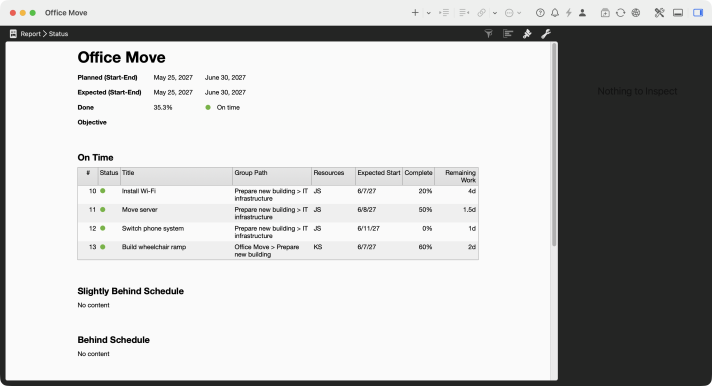
Status Report in Merlin Project
The report header shows planned and expected dates, percent complete and schedule status, in the sample project office move 35.3 percent and on schedule. You copy these values straight into your executive summary. The lesson Creating and customizing reports explains all six module types, and the feature page Reports in Merlin Project shows examples. Reports are part of Merlin Project, not Merlin Project Express.
For business plans and proposals, use the mind map template below: the seven building blocks are ready as branches, and you add text or graphics directly in the mind map view of Merlin Project.
Free Executive Summary Templates
All templates contain the seven building blocks from this article. Download the format you work with:

If you have any questions about this blog article or would like to discuss it, we look forward to your contribution in our forum.
Frequently asked questions
What is an executive summary?
An executive summary is a standalone short version at the start of a report, proposal or business plan. It states goal, results, key figures and a recommendation so that decision makers can act without reading the full document.
How long should an executive summary be?
An executive summary is one to two pages long. The rule of thumb is 5 to 10 percent of the main document, so one to two pages for a 20-page report. Half a page is often enough for a project status report.
What is the difference between an executive summary and an abstract?
An abstract orients the reader of an academic paper and is usually shorter. An executive summary replaces the main document for decision makers: it contains results, figures and a recommendation and can be read on its own.
When do you write the executive summary?
Write the executive summary last, once all figures and results of the main document are final. In the finished document it still comes first.
What goes into the executive summary of a project status report?
Overall status as a traffic light, progress against plan, schedule and cost situation, the main risks and the decisions the client needs to make, each with a deadline. You will find a full example in this article.