
| Capability | Merlin Project (macOS/iOS) | Microsoft Project (Planner and Project Plan 3) |
|---|---|---|
| Project planning & Gantt | Gantt chart with critical path, baselines and dependencies on Mac, iPad and iPhone | Planner in the browser: timeline with dependencies including lead and lag, critical path and baselines. Network diagram and Team Planner only in the desktop client (Windows). |
| Resource management | People, companies, equipment and material; utilization view, resource leveling, resource pool across projects | Planner: assignments and people view. Automatic resource leveling and resource costs only in the desktop client (Windows). |
| Budget & cost tracking | Built-in costs, hourly rates, planned vs. actual reports | Planner: custom fields and Power BI reporting. Cost rates and planned vs. actual in the desktop client (Windows). |
| Collaboration | Sync via iCloud Drive, Dropbox or a file server; comments, attachments; works offline and online | Sharing in Microsoft 365 and Teams, comments, automation; Planner needs an internet connection. |
| Multi-project management | Master and subprojects, shared resource pool, portfolio reports | Planner: portfolios across several plans (they replace the former Roadmap). Master projects in the desktop client (Windows). |
| Portfolio/large projects | Handles thousands of activities locally; fast on the device | Built for enterprises on Microsoft 365; performance depends on plan structure, automations and network. |
| MS Project files | Opens .mpp, .mpt, MS Project XML and MPX; exports MS Project XML | Desktop client: native .mpp. Planner: no .mpp import, only through the Planner Power App |
| Platform | Native on Mac, iPad, iPhone, Vision Pro | Planner in the browser on any OS. Desktop client for Windows only; on a Mac only inside a virtual machine. |
| Pricing | Mac subscription US$22.99 per month or US$229.99 per year, see pricing | See Microsoft pricing page |
| Trial | 30-day free trial | See Microsoft pricing page |
| Best for | Project leads and PMOs on Apple devices who manage schedules, resources and costs in one app and work offline | Organizations on Microsoft 365 with Windows workstations; Mac teams only get Planner in the browser. |
Product Comparisons
Merlin Project vs. Microsoft Project
There is no Microsoft Project app for Mac: Microsoft ships the Project desktop client for Windows only. On a Mac, you either use Microsoft Planner in the browser or run Windows in a virtual machine such as Parallels Desktop. Merlin Project runs natively on Mac, iPad and iPhone, opens MPP files from MS Project and comes with a 30-day free trial.

Merlin Project
Native project management software for Mac, iPad and iPhone

Microsoft Project (Planner and Project Plan 3)
Planner in the browser, Project desktop client for Windows only
Quick comparison chart
As of October 22, 2026. On the Microsoft side we compare the “Planner and Project Plan 3” license: Planner in the browser plus the Project desktop client for Windows. Project for the web became part of Planner in August 2025, and Microsoft retired Project Online on September 30, 2026.
Is there Microsoft Project for Mac?
No, Microsoft does not offer Project as a Mac app: the Project desktop client runs on Windows only, and Microsoft lists Windows 11, Windows 10 and Windows Server 2019 as supported systems (Microsoft, Project Standard 2024). Mac users have three ways to work:
- Planner in the browser: Microsoft moved Project for the web into Planner in August 2025 (Microsoft Planner FAQ). Timeline, critical path and baselines require the “Planner and Project Plan 3” license.
- Windows in a virtual machine: With Parallels Desktop or VMware Fusion you install Windows and then the Project desktop client inside it. You need an additional Windows license for this.
- A native Mac app: Merlin Project for Mac opens MS Project files, calculates the critical path and syncs with iPad and iPhone.
Project Online has been retired: what does that mean for your projects?
Microsoft retired Project Online on September 30, 2026 (Microsoft Lifecycle). According to the Microsoft 365 Message Center notice (MC1478955), customers can no longer access their projects or any associated data within the service; Microsoft does not provide read-only access (Microsoft Tech Community). As successors, Microsoft names Planner with the “Planner and Project Plan 3” license, Project Server Subscription Edition and Dynamics 365 Project Operations. The Project desktop client is not affected.
For Mac teams, this leaves no Microsoft option without a browser or Windows: Planner runs in the browser only, Project Server and the desktop client need Windows. If you saved your plans as .mpp or XML files before the deadline, open them in Merlin Project and keep planning locally on Mac and iPad. Our article Project Online Ends in 2026: The Alternative for Real Project Management covers the deadlines and alternatives in detail.
Can Merlin Project open MPP files?
Yes, Merlin Project opens MS Project files directly via File > Open: .mpp and .mpt (the manual lists Microsoft Project 2000 to 2013), MS Project XML and MPX. Merlin takes over activities, resources, dependencies and costs. In the other direction, Merlin Project exports an MS Project XML file that your colleagues open in Project on Windows.
So you don't need a separate MS Project viewer on your Mac. Keep two limits in mind: Merlin does not open password-protected .mpp files, so remove the protection in Project first. And Merlin shows the imported plan in its own Gantt view, not in Project's layout. If an .mpp file from a newer Project version does not open, save it in Project as XML Format and open that file instead. The FAQ Can Merlin Project view files from Microsoft Project? lists which values arrive differently after conversion.
Switching from MS Project or Project Online: step by step
- Get the file: Copy the .mpp file or the XML export to your Mac. In the Project desktop client, you create the XML export via File > Save As with the file type XML Format.
- Open it in Merlin: In Merlin Project, choose File > Open and select the file. Merlin detects the format and creates a new project.
- Read the notifications: Anything Merlin can't take over appears in the Notifications window (Window > Show Notifications). Cost resources become base costs, empty activity rows are dropped, milestones with a duration arrive as normal activities.
- Check the plan: Review dependencies, durations and work values, the resource assignments and the calendar settings.
- Save as a Merlin document: Save the project right away in the .mproject format so you can use every feature.
Hand plans back to Windows colleagues
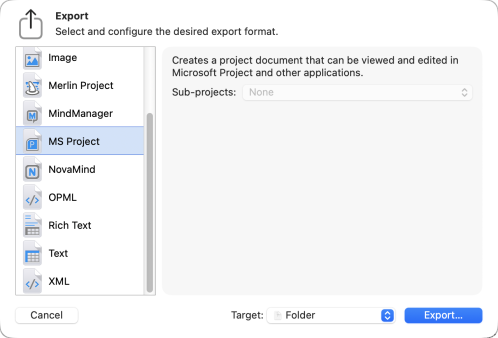
If partners or clients keep working in Project, choose File > Export in Merlin Project and the MS Project format. Merlin writes an XML file that Project on Windows opens. The Sub-projects pop-up menu decides whether Merlin inlines subprojects or writes them to separate files. All formats are listed in the FAQ Which import and export formats can Merlin Project handle?
What we found in our hands-on test
In 2024 we tested Project for the web with a Plan 3 license; Microsoft moved that interface into Planner in August 2025. The full review is in our Microsoft Project Plan 3 test report.
- Heavy sign-up: For the trial, Microsoft asked for name, address, phone verification and payment details.
- Few project settings: Apart from start date and work week, we found no basic settings such as working hours or holidays in the web interface.
- Interface glitches: We saw duplicate link lines, sticky labels and unexpected linking behavior.
- Assignments tied to Microsoft accounts: People without a Microsoft 365 account could not be assigned in web planning without a workaround.
For teams that already work on Microsoft 365 and Windows, these points weigh less. Mac teams carry this overhead on top of the missing desktop app.
Planning and scheduling

Merlin Project: native Mac project planning
Define activities, dependencies and milestones in the work breakdown structure. Merlin Project draws the Gantt chart, calculates the critical path and freezes a baseline on request. Ideas from the mind map flow into the plan automatically, and back. If you work agile, move cards on the Kanban board and watch the Gantt bars follow.
Microsoft Project: Planner in the browser, full scheduling on Windows
In Planner premium plans you link tasks with all four dependency types including lead and lag, and filter the critical path (Microsoft Planner Blog). Microsoft lists network diagram, Team Planner and task path analysis as features of the desktop client (Microsoft Learn), which runs on Windows only. In our hands-on test, the web interface showed duplicate link lines and hard-to-predict linking behavior.

Managing your team

Merlin Project: resources across project boundaries
Manage people, equipment and material in one utilization view. You see conflicts across projects at once. Resource leveling delays low-priority assignments first, and the critical path recalculates automatically. Costs follow from hourly rates and fixed costs, without everyone on the team having to use the software.
Microsoft Project: assignments in Planner, leveling on Windows
Planner shows who is assigned to which task; assignments usually require Microsoft 365 accounts. Microsoft lists automatic resource leveling, material resources and resource costing as desktop client features. Mac teams need a Windows environment for them.

Tracking the money

Merlin Project: costs in the same plan
Budgets per project, phase or activity. Merlin Project adds up labor costs from hourly rates and material from fixed costs automatically. A report shows the planned vs. actual variance per activity. You spot cost trends before they turn into problems and walk into budget talks with stakeholders prepared.
Microsoft Project: cost fields in Planner, cost rates on Windows
In Planner you model costs with custom fields and analyze them in Power BI. Cost rates, budgets and the planned vs. actual cost comparison come with the desktop client. In our test, reports and exports mostly went through Excel or Power BI.

Multi-project management
Merlin Project: master and subprojects
Combine subprojects in a multi-project document. Changes flow both ways: what you change in a subproject shows up in the master project, and vice versa. A shared resource pool keeps hourly rates and availability in one place and shows overloads across all linked projects. Reports sum up critical paths, bottlenecks and costs for the whole program.
Microsoft Project: portfolios in Planner
Planner groups premium plans into portfolios; they replace the Roadmap from Project for the web and do not show Project Online projects (Microsoft Planner FAQ). Master projects exist in the desktop client on Windows. For portfolio and capacity management on your own servers, Microsoft names Project Server Subscription Edition after the end of Project Online.
Collaboration
Merlin Project syncs a project via iCloud Drive, Dropbox, another cloud service or a file server. The technology behind it is called MagicSync and is patented. Several people edit the same plan, offline too; Merlin merges the changes at the next sync. Comments and attachments sit right on the activity. People without Merlin see projects as exported web pages.
Microsoft Project shares plans in Microsoft 365, with permissions, comments and connections to Teams, OneDrive and Power Platform. Planner needs an internet connection for all of this.
Web or desktop tool?
Web tools centralize access and automate workflows, but they need internet and the vendor's infrastructure. Desktop tools store data locally and work offline, but they need a sharing strategy. Decide based on compliance requirements, availability and your team's makeup.
Performance and scalability
Merlin Project: Local files handle thousands of activities without a round trip to a server.
Microsoft Project: Planner is built for enterprise use in Microsoft 365. As with most web tools, performance depends on plan structure (dependencies, fields), automations and network quality.
Which devices does each tool run on?
Merlin Project: built for Apple devices
Merlin Project runs natively on Mac, iPad, iPhone and Vision Pro. Trackpad gestures, AppleScript, Stage Manager and the Shortcuts app work as in any Mac app. There is no Windows version; what Windows teams can do instead is on the page Merlin Project for Windows.
Best for: teams on Apple devices who value offline work and control over their data.
Microsoft Project: browser first, desktop on Windows only
Planner runs in any current browser, including on a Mac. The Project desktop client comes with the “Planner and Project Plan 3” and “Planner and Project Plan 5” licenses (Microsoft Learn) and runs on Windows only. If you need offline planning or desktop features on a Mac, you are left with a Windows VM or a Mac-native tool.
What should an MS Project alternative for Mac offer?
Decide which requirements your team must meet before you start testing. These questions help you choose:
- Offline or online only? Merlin Project stores projects as local files and syncs as soon as you are back online.
- Exchange with MS Project? Merlin opens .mpp, .mpt, MS Project XML and MPX and exports MS Project XML (see opening MPP files).
- Mobile on site or at the client? The iPad app has almost all features of the Mac version.
- Teamwork? Users with their own permissions work in the same document. In the private work area, your changes stay with you until you publish them.
- Budget and resources? Merlin calculates costs, hourly rates and utilization in the same plan, without Power BI or add-on tools.
- Test before you buy? You can try Merlin Project free for 30 days.
- Help getting started? The manual is available in six languages, plus learning paths and an FAQ.
