The waterfall model is a sequential approach that breaks a project into consecutive phases, from requirements to operations. Each phase starts only once the previous one has delivered its result. Winston W. Royce described this sequence in seven steps at IEEE WESCON in 1970 and called the pure form risky himself.
What Is the Waterfall Model?
The waterfall model is a linear process model in which a project runs through its phases exactly once and in a fixed order. The output of one phase is the input of the next. In a Gantt chart this creates the typical staircase that gives the model its name.
Four building blocks turn a project into a waterfall model:
- Phases with a clear start and end, for example design or testing.
- Deliverables per phase, such as the requirements specification, design specification or test report.
- Milestones at the end of each phase, where the client or project lead approves the result. Read more in the glossary entry on milestones in project management.
- Finish-to-start dependencies between phases: phase 2 starts when phase 1 ends.
Where Does the Waterfall Model Come From?
The waterfall model comes from software engineering. Winston W. Royce introduced it in 1970 in his paper Managing the Development of Large Software Systems (Proceedings IEEE WESCON, August 1970, pages 1 to 9). His Figure 2 shows seven steps: system requirements, software requirements, analysis, program design, coding, testing and operations.
Royce considered this pure sequence dangerous. Right below the figure he wrote: "I believe in this concept, but the implementation described above is risky and invites failure." His reasoning: testing at the end is the first moment the system behaves for real. If a design flaw shows up there, the project returns to the start, and Royce expects up to a 100 percent overrun in schedule or cost.
As a remedy he recommended five additions: program design comes first, document the design, do it twice (first as a pilot), plan and monitor testing, and involve the customer formally. Royce never uses the word "waterfall". To current knowledge it first appears in 1976 in a paper by Thomas E. Bell and T. A. Thayer at the 2nd International Conference on Software Engineering, which credits Royce.
What Are the Phases of the Waterfall Model?
In practice the waterfall model usually has six phases: requirements, design, implementation, testing, deployment and maintenance. Royce listed seven steps; textbooks often merge system and software requirements. What matters is the deliverable each phase hands over.
| Phase | Deliverable | Milestone at the end of the phase |
|---|---|---|
| 1 Requirements | Requirements specification: what must the system do? | Requirements signed off |
| 2 Design | Design specification and architecture: how will it be built? | Design approved |
| 3 Implementation | Complete, working system | Code freeze |
| 4 Testing | Test report, fixed defects | Acceptance granted |
| 5 Deployment | Installed system, trained users | Go-live |
| 6 Maintenance | Bug fixes and updates in operation | End of contract or replacement |
What Does a Waterfall Project Look Like? An Example
A software company builds a customer portal for a property developer, where buyers check fit-out choices and construction dates. The developer pays a fixed price, and the requirements are agreed before the contract is signed. The project runs 18 weeks until go-live.
Customer portal as a waterfall project
Six phases, five milestones, all phases linked finish-to-start
Three numbers from the example show how the model behaves:
- Delay: If the developer signs off the requirements one week late, go-live moves from week 18 to week 19. Every phase is on the critical path, so every delay pushes the end date.
- Weight of the phases: Implementation takes 8 of 18 weeks (44 percent), testing only 3 weeks (17 percent).
- Jump back: If testing in week 15 reveals a design flaw, the team repeats design (3 weeks), implementation (8 weeks) and testing (3 weeks). That is 14 weeks; go-live moves from week 18 to week 32, which is 78 percent later. This is exactly the risk Royce warned about.
Is There a Waterfall Project Management Template?
Yes. Merlin Project offers two free templates that map a phase-based project with milestones. The Software Development template splits a development project into evaluation, concept, specification, development, test and delivery phases; decision milestones such as "Specification completed" separate the phases. The Single-Family Home template applies the same logic as a construction schedule, from preliminary design to the shell.
Waterfall template for Merlin Project
The template contains the typical phases of a development project with milestones between them. Download the file, delete the phases you do not need and add your own activities. The template is available in English, German, Spanish and French.
 Open the Software Development template
Starting without Merlin Project? Copy the structure of the example as a table. Each row becomes an activity or milestone, and the "Predecessor" column defines the finish-to-start dependency:
| # | Activity | Type | Duration | Predecessor |
|---|---|---|---|---|
| 1 | Gather requirements | Activity | 3 weeks | none |
| 2 | Requirements signed off | Milestone | 0 | 1 |
| 3 | Design and design specification | Activity | 3 weeks | 2 |
| 4 | Design approved | Milestone | 0 | 3 |
| 5 | Implementation | Activity | 8 weeks | 4 |
| 6 | Code freeze | Milestone | 0 | 5 |
| 7 | System and acceptance testing | Activity | 3 weeks | 6 |
| 8 | Acceptance granted | Milestone | 0 | 7 |
| 9 | Deployment and training | Activity | 1 week | 8 |
| 10 | Go-live | Milestone | 0 | 9 |
| 11 | Maintenance | Activity | ongoing | 10 |
When Should You Use the Waterfall Model?
Use the waterfall model when the requirements are fixed before the start and hardly change during delivery. Typical cases are construction, projects that need regulatory approval and fixed-price contracts. On a house, the roof follows the walls because the structure allows no other order.

Waterfall fits when
- client and team can write down the requirements before the start,
- authorities, auditors or the contract demand approvals at fixed points,
- a fixed price or a fixed deadline is agreed,
- physical dependencies force the order (foundation first, then walls).
Waterfall does not fit when
- requirements only emerge from user feedback,
- the team must show a working interim version early,
- the market or technology changes during the project,
- a late test leads to an expensive jump back, as in the example above.
Waterfall vs. Agile vs. Hybrid: What Is the Difference?
Waterfall plans the whole project up front and delivers at the end; agile methods such as Scrum plan in short cycles and deliver a usable result after each cycle. Hybrid project management combines both: phases and milestones for the frame, agile work inside a phase.
| Criterion | Waterfall | Agile (e.g. Scrum) | Hybrid |
|---|---|---|---|
| Planning | Entire project before the start | Per sprint, one month or less | Phases up front, tasks per phase |
| Changes | Through a formal change request | Any time via the backlog | Within the phase |
| Client involvement | At the milestones | In every sprint review | At milestones and reviews |
| Delivery | Once at the end | After every sprint | Per phase or release |
| Typical view | Gantt chart | Kanban board | Gantt and Kanban linked |
How teams set up the mix is covered in our article on hybrid project management.
How to Plan a Waterfall Project in Merlin Project
Merlin Project maps the waterfall structure in the Work Breakdown view: the outline on the left, the Gantt chart on the right. To rebuild the example:
- Open View > Work Breakdown > Entry and create each phase as a group. Press Ctrl+Cmd+→ to indent the activities under their phase.
- Add a milestone at the end of each phase with Insert > Milestone (Cmd+Alt+M). It appears as a diamond in the Gantt chart.
- Select phases and milestones in their order and choose Structure > Link > End to Start (Ctrl+Cmd+L). Merlin Project links the selection one after the other.
- Turn on View > Show Critical Path to highlight the chain that determines go-live.
- On the day of approval, enter that date in the Reference Date field of the Project Settings. From then on, the Plan/Actual Comparison (Time) view shows every deviation against this baseline.
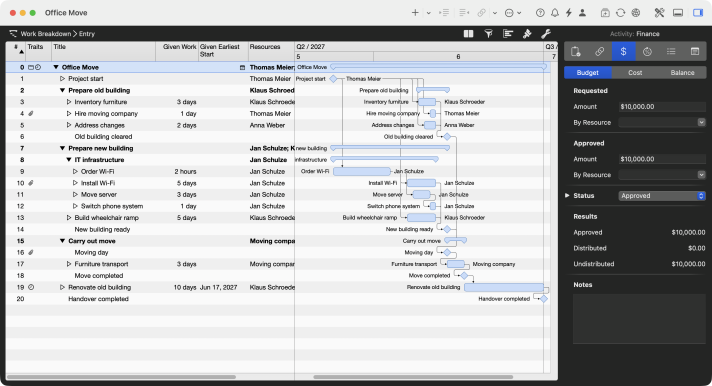
Phases and milestones in the Work Breakdown view
The example from the Merlin documentation shows an office move in three phases. A milestone follows each group, and the arrows in the Gantt chart show the finish-to-start dependencies.
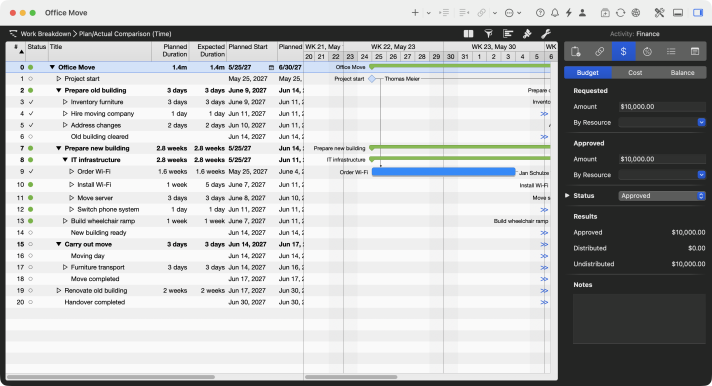
A baseline without extra steps
Merlin Project stores the complete project history in the document. You never have to save a baseline by hand: a date in the Reference Date field is enough, and gray reference bars show the period planned at that time. Details in the lesson on plan/actual comparison.
For the implementation phase, the hybrid route pays off. Press F2 to show the Detail View and choose the Kanban board there. Select the phase at the top, and the board below shows only its activities. Drag a card from "Backlog" to "Done", and Merlin Project sets the activity's progress to 100 percent; the bar in the Gantt chart shows it at once.
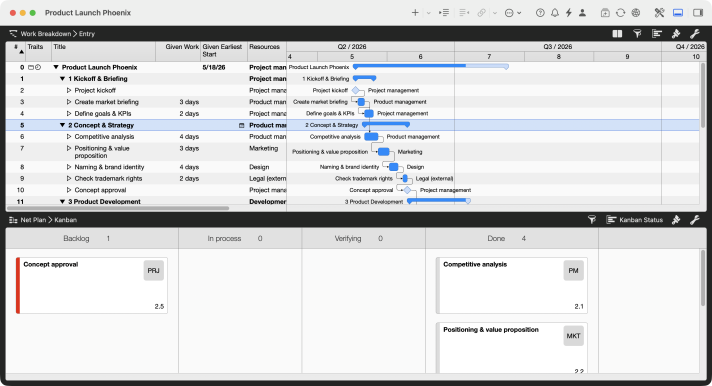
Waterfall on top, Kanban below
The phase plan with milestones sits on top, the Kanban board for the selected phase below. Both views show the same activities, and a change appears in both immediately.
If you have any questions about this blog article or would like to discuss it, we look forward to your contribution in our forum.
Frequently asked questions
What is an example of the waterfall model?
A customer portal with fixed requirements: requirements (3 weeks), design (3 weeks), implementation (8 weeks), testing (3 weeks) and deployment (1 week) follow one after the other. Each phase ends with a milestone such as "Requirements signed off". Go-live comes after 18 weeks. Building a single-family home follows the same logic.
What are the phases of the waterfall model?
In practice usually six: requirements, design, implementation, testing, deployment and maintenance. Winston W. Royce listed seven steps in 1970 because he separated system and software requirements. Each phase delivers a reviewable result, such as a requirements specification or a test report.
Is there a free waterfall project management template?
Yes. The "Software Development" template for Merlin Project contains phases with decision milestones, the "Single-Family Home" template a phase-based construction schedule. Both are free to download from the templates section. You can try Merlin Project free for 30 days.
Who invented the waterfall model?
The sequence goes back to Winston W. Royce, who described it in 1970 in "Managing the Development of Large Software Systems". Royce himself called the pure form risky and recommended feedback loops and a pilot run. The name "waterfall" was first used by Thomas E. Bell and T. A. Thayer in 1976.
Where is the waterfall model applied in real life?
Wherever the order is fixed and changes are expensive: construction, plant engineering and fixed-price contracts with signed-off requirements. Defense software is a historic case: in 1985 the US Department of Defense required contractors to follow a six-phase sequence under DOD-STD-2167.
Is the waterfall model agile?
No. The waterfall model plans the whole project before it starts and delivers once at the end. Agile methods such as Scrum plan in sprints of one month or less (Scrum Guide 2020) and deliver after every sprint. Hybrid approaches use waterfall phases as a frame and work agile within a phase.