
| Capability | Merlin Project (macOS/iOS) | ClickUp (web/desktop/mobile) |
|---|---|---|
| Project planning & Gantt | Advanced Gantt with critical path, dynamic baselines, constraints | Good-to-advanced: Gantt with dependencies, critical path & slack; baselines not native and often handled via workarounds/templates. |
| Resource management | Robust: people/equipment/materials, utilization, multi-project leveling | Workload & capacity views across projects; no true automatic resource leveling; structure and estimates drive accuracy. |
| Budget & cost tracking | Built-in costs, rates, planned vs. actual reports | Manual/Template-based: time tracking is native; cost/budget tracking via custom fields, formulas, templates, and integrations. |
| Collaboration | File-based sharing; comments, attachments; works offline and online | Real-time web collaboration with docs, whiteboards, automations, and 1,000+ integrations. |
| Multi-Project Management | Advanced: master/subprojects, shared resource pools, portfolio reports | Portfolios, dashboards & Everything-level views aggregate across Spaces/Folders/Lists; resource pooling/leveling is not native. |
| Portfolio/large projects | Handles thousands of activities locally; fast on device | Scales for teams, but platform limits apply (e.g., 50k tasks per List, subtask limits); performance depends on architecture |
| Platform | native Mac, iPad, iPhone, Vision Pro | Any browser + desktop & mobile apps; offline limited (tasks/reminders; partial) |
| Pricing | See price list | See pricing |
| Trial | 30-Days Free Trial | Free 14-day trials (availability varies) |
| Best for | PMOs/pro PMs on Apple who need advanced scheduling, resource management & costs tracking functionality | Teams wanting an all-in-one, highly customizable workspace with dashboards, docs, automations, and who can invest in setup/governance. |
Product Comparisons
Merlin Project vs. ClickUp
Merlin Project
Project management software on Apple devices

ClickUp
Web-based work management
Quick comparison chart
Desktop power meets simplicity: The ultimate ClickUp alternative
Planning & Scheduling

Merlin Project: Fully Featured Project Planning
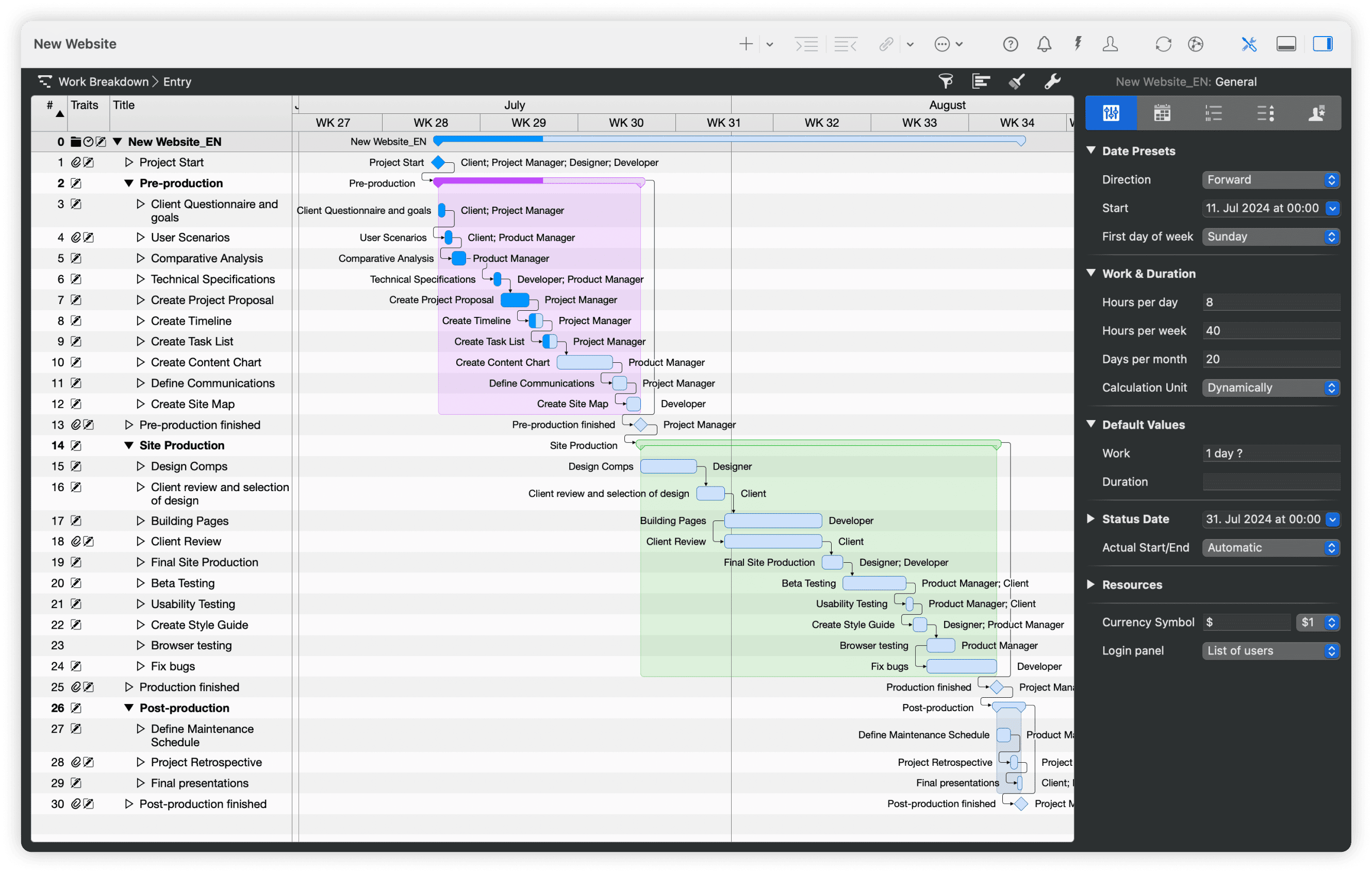
Brainstorming with mind maps that capture every important idea and stakeholder input. Then automatically transform your ideas into structured work breakdown hierarchies with full dependency modeling. Switch to the Kanban view for daily execution while your timeline stays perfectly accurate.
Changes in one view instantly appear everywhere else. The critical path show bottlenecks in real time and dynamic baselines let you compare your current progress against earlier versions.
ClickUp: Gantt with Dependencies, Critical Path & Slack
ClickUp supports dependencies and can show critical path and slack time in Gantt. It’s approachable for simple-to-mid complexity schedules. However, schedule baselines aren’t native, so variance analysis often relies on templates, custom fields, or dashboards. Users also report gaps or quirks in Gantt (e.g., grouping, rescheduling) that require workarounds or patience.

Managing Your Team

Merlin Project: True Resource Intelligence
Go beyond simple task assignments by managing people, equipment, materials, and external companies as real resources with different capabilities and constraints.
The system automatically balances workloads across your entire project portfolio, suggesting schedule adjustments when team members become overloaded. Cost calculations happen behind the scenes using hourly rates and fixed expenses you set up once.
ClickUp: Workload & Capacity (Setup-Driven)
ClickUp’s Workload and resource management views visualize capacity across teams and timeframes (day/week/month). They depend on consistent estimates and structure; there’s no automatic resource leveling across multiple projects like desktop PM.

Tracking Money

Merlin Project: Financial Command Center
Merlin Project is your complete financial control system. Set up budgets at any level - whole projects, major phases, or individual tasks. The software tracks every expense automatically as work progresses, from hourly labor costs to equipment rentals and material purchases. Real-time reports show exactly where you stand against budget, highlighting which areas are running over or under. This gives you the confidence and data needed for stakeholder meetings, scope discussions, and resource allocation decisions.
ClickUp: Budgets via Fields/Templates
ClickUp includes native time tracking (billable/non-billable, timesheets) and integrates with external timers. Budgets/costs are typically modeled with custom fields & formulas and surfaced on dashboards or via templates. Calculations such as budget sums are only available in the business tier. If you need EVM-style reporting, expect configuration or third-party tooling.

Multi-Project Management
Merlin Project: Portfolio Orchestration
Create a master project that acts as mission control for your entire program, with live connections to individual subprojects that update automatically in both directions. Resource pools span across all projects, preventing double-booking while showing you the complete picture of team availability and utilization.
ClickUp: Portfolios, Dashboards & Everything View
ClickUp organizes work in Spaces → Folders → Lists with Portfolios and dashboard cards to roll up progress across many projects. It’s flexible and wide, but not the same as native multi-project resource pooling/leveling found in desktop PM.
Working Together
Merlin Project works by sharing files. Team members save the same project file on cloud services like iCloud or Dropbox. The program prevents problems when multiple people edit at once. You can add comments and attach files to activities. People who don't use Merlin can view projects through web pages.
ClickUp is built for real-time collaboration: multiple editors, comments/@mentions, Automations, and integrations for notifications and handoffs.
Trade-offs of web vs desktop
Web tools centralize access and automate workflows but require connectivity and vendor infrastructure. Desktop keeps data local and performs consistently offline, but requires a sharing strategy. Choose based on compliance, uptime needs, and team composition.
Offline Mode exists in Clickup, but is limited (create tasks/reminders; partial mobile support). If offline execution is essential, this is a constraint.
Performance & Scale
Merlin Project: Local files handle thousands of activities smoothly; no round-trips to a server.
ClickUp: Designed for collaboration at scale, but task/list limits apply (e.g. 50,000 tasks per List) and subtask caps. Users report that performance hinges on architecture (custom fields, cross-sheet rollups) and network.
Understanding Platform Choices
Merlin Project: Mac Ecosystem by Design
Merlin Project works exclusively on Apple devices: Mac, iPad, iPhone and Vision Pro. This is an intentional design choice that allows deep integration into a system that simply works. Teams already using Mac computers get software that feels natural and works seamlessly with their existing workflow.
Best for: Teams already committed to Apple's ecosystem who value performance, offline capability, and data control.
ClickUp: Universal Access with Apps
ClickUp runs in any web browser and also offers desktop apps (Mac/Windows/Linux) and mobile apps. It still depends on connectivity for most functions; offline is limited to tasks/reminders and cached views.
Best for: mixed-platform teams who prioritize customization, dashboards, and automations over deep, native scheduling.
