
| Capability | Merlin Project (macOS/iOS) | awork (web/desktop/mobile) |
|---|---|---|
| Project planning & Gantt | Advanced: Gantt with critical path, dynamic baselines, constraints | Timeline with dependencies & milestones; not a strict Gantt. No official baseline/critical-path tooling documented. |
| Resource management | Robust: people/equipment/materials, utilization, multi-project leveling | Capacity planning & workload views from tasks/bookings/calendar; organization-wide auto-leveling not provided. |
| Budget & cost tracking | Built-in costs, rates, planned vs. actual reports | No Monetary budget, only time spent as metric: project/retainer budgets, time tracking, KPI reports. Less like desktop cost accounting. |
| Collaboration | File-based sharing; comments, attachments; works offline and online | Real-time web collaboration; awork Connect invites external partners (free) with granular visibility. External users aren’t included in capacity planning. |
| Multi-Project Management | Advanced: master/subprojects, shared resource pools, portfolio reports | All projects list & timeline; view overlaps/milestones across projects; resource pooling/leveling remains manual. |
| Portfolio/large projects | Handles thousands of activities locally; fast on device | Designed for teams; guidance for large organizations and custom dashboards via API if needed. |
| Platform | native Mac, iPad, iPhone, Vision Pro | Browser + desktop apps + iOS/Android; no offline mode (even desktop); no dedicated iPad app. |
| Pricing | See pricing | See pricing |
| Trial | 30-Days Free Trial | 14-day free trial, no credit card |
| Best for | PMOs/pro PMs on Apple who need advanced scheduling, resource management & costs tracking functionality | Mixed-platform teams prioritizing modern UI, time tracking, and capacity planning, okay with time/budget tracking and online-only use. |
Product Comparisons
Merlin Project vs. Awork
Merlin Project
Project management software on Apple devices

awork
Web-based project & team planning
Quick comparison chart
Native Mac efficiency with Merlin Project: The ideal alternative to awork
Planning & Scheduling

Merlin Project: Project Manager's Finest
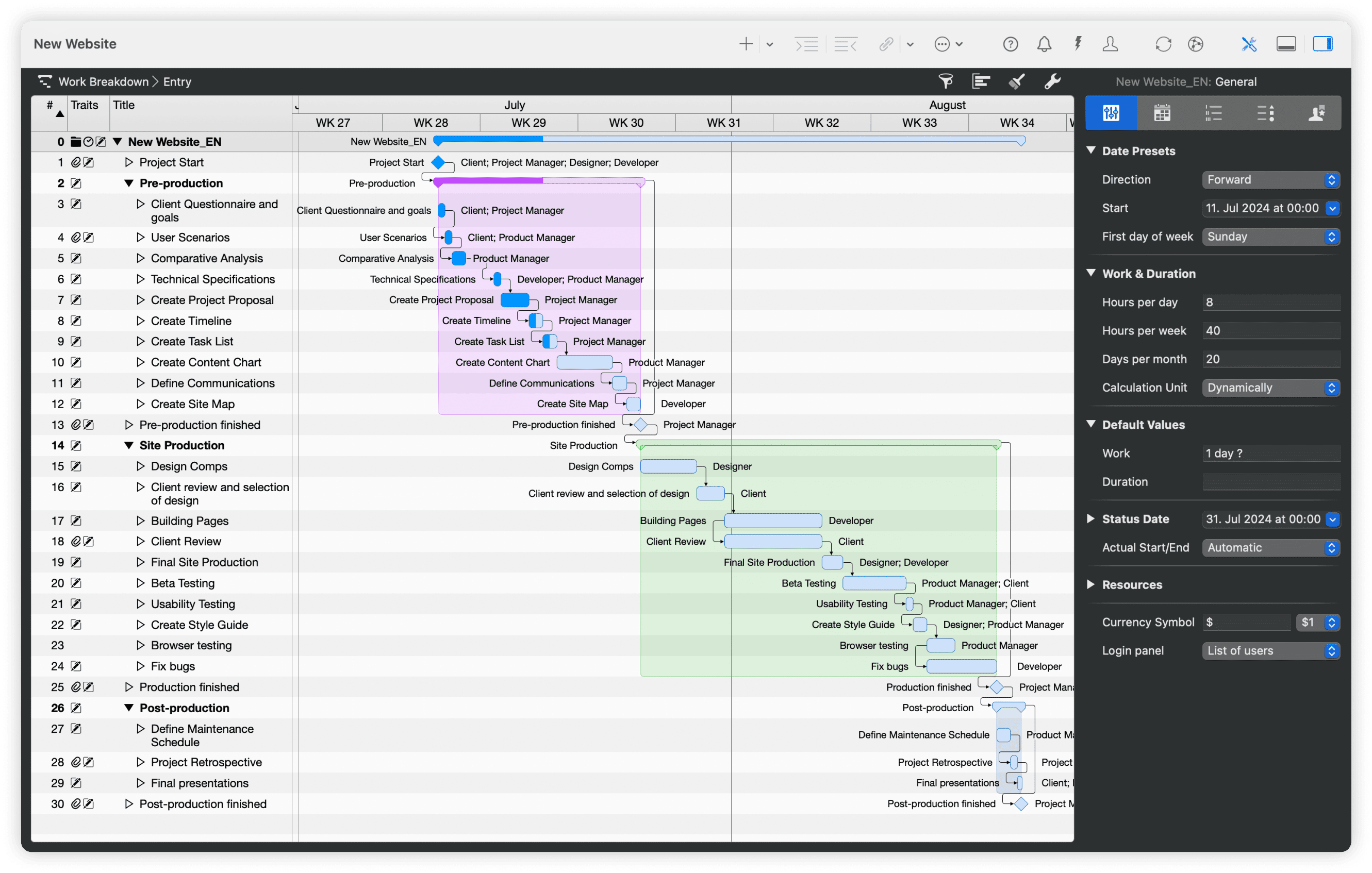
Start with mind maps to capture ideas, then move to Gantt charts for scheduling. Execute your plans using Kanban boards while keeping everything connected. Track the critical path in real time, maintain dynamic baselines to compare project revisions without losing the underlying structure. All views stay perfectly synchronized because they work from the same project file.
awork: Timeline with Dependencies
awork’s project timeline shows tasks over time with dependencies and milestones. Drag tasks, link them, and move chains when you toggle “move dependent tasks”. Teams needing variance analysis via baselines or critical paths typically handle it outside awork. Common caveats mention that reporting/analytics can feel basic and that some features on mobile lag behind desktop.

Managing Your Team

Merlin Project: Resources Beyond “Assignees”
Assign resources such as people, equipment, companies, and materials. Balance workloads across multiple projects, and calculate costs from rates automatically. Works even if collaborators don't use Merlin. You can add anyone to your project, including people who don't use the software or equipment that needs scheduling.
awork: Capacity Planning & Workload (No Auto-Leveling)
awork offers team scheduling and a workload overview that calculates capacity from tasks, bookings, and appointments; it’s excellent for seeing who’s over/underloaded. It doesn’t provide automatic resource leveling across projects like a desktop scheduling engine. You can invite external partners, but external users don’t appear in planner capacity views.

Tracking Money

Merlin Project: Built-in Money Tracking
Set a budget for the whole project or individual phases/activities. Then, set costs for activities and hourly rates for people.
With Merlin Project you always keep track of expenses and budget. Compare the planned versus actual costs and always know which parts were more or less expensive than expected. You are always prepared for tough financial discussions with your stakeholders.
awork: Budget Tracking Based on Time Spent
awork uses the term budget only for time spent, not for monetary expenses. It offers KPI reports to stay on budget. However, if you need granular, rate-based cost accounting inside the PM tool, expect to complement awork with integrations.

Multi-Project Management
Merlin Project: Master/Subprojects & Resource Pools
Merlin Project links multiple projects into a master document with live sub-projects, so updates roll up bidirectionally. Shared resource pools provide portfolio-level workload and cost control, with consolidated Gantt and reporting across projects.
awork: All-Projects View & Cross-Project Timelines
awork provides an All projects list with filters, grouping, exports, and a timeline to visualize date ranges and milestones across projects. High-level capacity across projects is available via the planner/workload views. However, true pooled, auto-leveled resources aren’t part of the model.
Working Together
Merlin Project works by sharing files. Team members save the same project file on cloud services like iCloud or Dropbox. The program prevents problems when multiple people edit at once. You can add comments and attach files to activities. People who don't use Merlin can view projects through web pages.
awork is built for real-time collaboration (comments, mentions, attachments) it lets you bring clients/partners into projects with fine-grained visibility (e.g., hide internal lists/comments). It’s quick to adopt; governance matters at scale.
Trade-offs of web vs desktop
Web tools centralize access and automate workflows but require connectivity and vendor infrastructure. Desktop keeps data local and performs consistently offline, but requires a sharing strategy. Choose based on compliance, uptime needs, and team composition.
awork does not offer an offline mode (even the desktop app is a wrapper for the web app). If offline execution on laptops is essential, plan accordingly.
Performance & Scale
Merlin Project: Local files handle thousands of activities smoothly; no round-trips to a server.
awork: Built for teams and documented for larger organizations; structure (projects, types, filters, workload) matters as you scale. For advanced portfolio analytics, teams often extend with dashboards via the API.
Understanding Platform Choices
Merlin Project: Mac Ecosystem by Design
Merlin Project works exclusively on Apple devices: Mac, iPad, iPhone and Vision Pro. This is an intentional design choice that allows deep integration into a system that simply works. Teams already using Mac computers get software that feels natural and works seamlessly with their existing workflow.
Best for: Teams already committed to Apple's ecosystem who value performance, offline capability, and data control.
awork: Browser-First with Desktop & Mobile
awork runs in any modern web browser and offers desktop apps plus iOS/Android. It requires an internet connection; the desktop app doesn’t work offline, and there’s no dedicated iPad app (browser recommended on iPad).
Best for: Mixed-platform teams who want accessible, real-time collaboration and integrated time/budget tracking.
