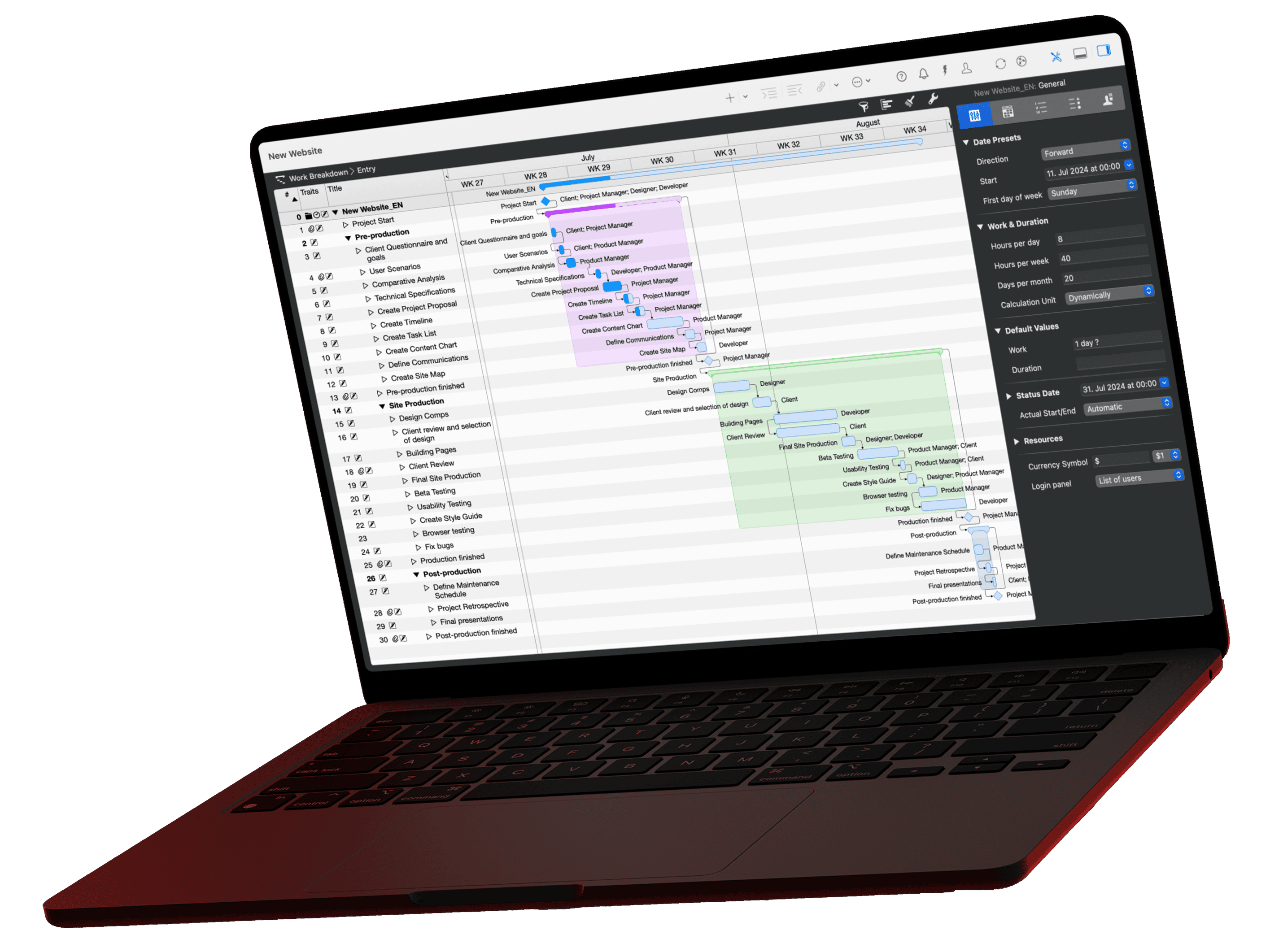
Time blocking is a time management method in which you divide your workday into fixed blocks in advance and assign each block a task or type of work. Cal Newport, a computer science professor at Georgetown University, popularized it with his book "Deep Work" (2016). He spends 10 to 20 minutes every evening planning the next day.
What is time blocking?
Time blocking is planning your workday in time blocks: instead of working from an open to-do list, you decide in your calendar when you work on what. Each block has one purpose, such as focused work, meetings or batched email.
The method combines two tools that usually live apart: the task list and the calendar. Only a block gives a task a time and a duration, and you see at once whether your day can hold it at all.
Cal Newport describes his approach like this: he splits a sheet of paper into two columns, gives each hour two lines and labels the blocks with specific tasks. The second column stays free for corrections when the day goes differently than planned (Cal Newport: Deep Habits, 2013). Time blocking is one of the techniques in our overview of time management.
What does a time blocking schedule look like?
A time blocking schedule divides the workday into blocks with a start time, purpose and duration, including breaks and buffers. The following example shows the Tuesday of a project manager who runs the construction of an apartment building for an architecture firm.
| Time | Block | Content | Duration |
|---|---|---|---|
| 7:30 to 8:00 | Planning | Review the plan, set priorities | 30 min |
| 8:00 to 10:00 | Focus block 1 | Update schedule, review change order | 120 min |
| 10:00 to 10:15 | Buffer | Overrun from focus block 1 | 15 min |
| 10:15 to 11:00 | Meeting | Weekly meeting with consultants | 45 min |
| 11:00 to 12:00 | Communication | Batched email and callbacks | 60 min |
| 12:00 to 12:30 | Break | Lunch | 30 min |
| 12:30 to 13:45 | Meeting | Site walk | 75 min |
| 13:45 to 14:00 | Buffer | Travel, notes from the site walk | 15 min |
| 14:00 to 16:00 | Focus block 2 | Cost control, invoice review | 120 min |
| 16:00 to 16:30 | Communication | Approvals and questions | 30 min |
| 16:30 to 17:00 | Planning | Wrap-up, plan for tomorrow | 30 min |
Day bar: a project manager's time blocking
Tuesday, 7:30 to 17:00, block height matches duration
What makes the schedule work:
- Focus blocks in one piece: Two 120-minute blocks sit where no meetings interrupt. The first starts before the weekly meeting, so the updated schedule goes into the meeting.
- Batched communication: Email and callbacks run in two fixed blocks with 90 minutes in total. Outside of them, the inbox stays closed.
- Buffers right after blocks that tend to overrun: 15 minutes follow the first focus block and the site walk.
- Planning at the start and the end: The last 30 minutes prepare the next day, as Newport describes.
How do I create a time blocking plan?
You create a time blocking plan by entering fixed appointments first, placing the tasks with the biggest impact in focus blocks and batching small tasks. Plan the evening before and adjust the plan as soon as the day changes.
- Enter fixed appointments: Meetings, site visits and deadlines go into the calendar first.
- Pick the most important tasks: Which one or two tasks move the project furthest today? The Eisenhower matrix and the Pareto principle help you choose.
- Reserve focus blocks: Plan longer blocks in one piece during the quietest hours of your day, in the example two blocks of 120 minutes.
- Batch small tasks: Email, callbacks and admin get their own blocks.
- Plan buffers and breaks: Put buffers after blocks whose duration is hard to estimate.
- Replan in the evening: Move whatever was left over and build the plan for the next day.
What variations of time blocking are there?
The three best-known variations of time blocking are task batching, day theming and timeboxing. They differ in what a block bundles: similar tasks, a whole day per topic or a fixed time limit for a single task.
| Variation | What the block defines | Example from project work |
|---|---|---|
| Task batching | Similar small tasks in one block | All callbacks to consultants from 11:00 to 12:00 |
| Day theming | One topic for a whole day | Monday planning and tendering, Thursday site |
| Timeboxing | A fixed time limit for one task | Compare bids in 45 minutes at most, then decide |
Timeboxing vs time blocking: what is the difference?
Time blocking defines when you work on something. Timeboxing defines how long a task may take at most: when the time is up, the work stops and you evaluate the result. You can combine both methods.
In project management, you know timeboxing from Scrum. The Scrum Guide 2020 defines sprints as fixed-length events of one month or less, and the Daily Scrum lasts 15 minutes. Our glossary explains the sprint in more detail.
| Time blocking | Timeboxing | |
|---|---|---|
| Guiding question | When do I work on what? | How long may it take? |
| Unit | Calendar block with a start time | Time limit for a task or event |
| End of the block | Task moves to the next free block | Work stops, result is evaluated |
| Typical use | Personal daily planning | Meetings, sprints, decisions |
Is time blocking effective?
Time blocking is effective when you keep your time estimates realistic and adjust the plan when disruptions occur. We found no controlled studies on time blocking itself; two well-documented research findings support the mechanism, though.
- Specific plans work: A meta-analysis by Peter Gollwitzer and Paschal Sheeran across 94 independent tests found a medium-to-large effect on goal attainment for if-then plans that define when and where (d = .65) (Gollwitzer and Sheeran, 2006). A time block is such a plan.
- Estimates are too optimistic: In a study by Roger Buehler and colleagues, 37 students estimated they would finish their thesis in 33.9 days. They actually took 55.5 days, and only 29.7% finished within their estimate (Buehler, Griffin and Ross, 1994). That is why every block plan needs buffers.
Newport himself estimates that a 40-hour time-blocked week produces as much output as 60 hours without structure. He gives no data for this figure; it reflects his personal experience.
What are the pros and cons of time blocking?
Time blocking protects time for focused work and shows whether your day can hold the planned tasks at all. The price is planning effort and less room for the unexpected.
| Pros | Cons |
|---|---|
| Protected time for focused work | A rigid plan leaves little room for spontaneous requests |
| Fewer context switches thanks to batched small tasks | Overly optimistic estimates create pressure |
| Realistic view of the time available | 10 to 20 minutes of planning every evening |
| Less procrastination, because every task has a slot | Hard to keep when others fill your calendar |
Tips against the cons: Keep buffers free, in the example 30 minutes a day, and increase them if blocks regularly overrun. Announce focus blocks to your team, for example as an appointment in the shared calendar. If you prefer cards over clock times, personal kanban is an alternative.
How does Merlin Project support time blocking?
Merlin Project schedules project work only in the working hours you define for a resource. If you enter a person's focus blocks as work intervals in their resource calendar, the project plan calculates with exactly the hours that time blocking keeps free for project work.
Here is how to set it up:
- Select the resource: In the Resources view, select the project manager and open the Calendar tab in the Inspector.
- Set work intervals: Under Complement for Resource, in the Regular Week area, define the Work intervals for each weekday, in the example 8:00 to 10:00 and 14:00 to 16:00. Merlin shows the total, here 4 hours.
- Check the utilization: Assign activities to the project manager. If the work exceeds her focus hours, the Status column of the Resources view rates her as Over-utilized.
You keep managing the blocks themselves in your calendar. Merlin makes sure that end dates in the project plan rest on the hours your focus blocks actually provide. Our glossary explains what a resource calendar does.
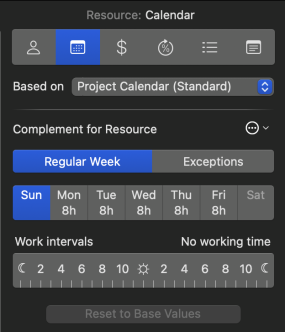
Focus blocks as work intervals
In the Calendar tab of the Resource Inspector, you drag the work intervals for each weekday on the hour bar. Exceptions such as vacation or training days go into the Exceptions area. The lesson resources in Merlin Project shows it step by step, and the article full-time and part-time resources explains part-time models.
If you have any questions about this blog article or would like to discuss it, we look forward to your contribution in our forum.
Frequently asked questions
What is time blocking?
Time blocking is a time management method in which you divide your workday into fixed blocks in advance and assign each block one task or type of work. Cal Newport popularized it with his book Deep Work (2016).
How long should a time block be?
There is no fixed rule. Cal Newport plans with two lines per hour, so in half-hour steps. In the example in this article, focus blocks last 120 minutes and communication blocks 30 to 60 minutes. Adjust the length once you see which blocks regularly overrun.
Is time blocking effective?
Time blocking works when your time estimates are realistic and you plan buffers. Research on specific when-and-where plans shows a medium-to-large effect on goal attainment (d = .65 across 94 tests). At the same time, people clearly underestimate how long tasks take, so every plan needs buffers.
What is the difference between timeboxing and time blocking?
Time blocking defines when you work on a task. Timeboxing defines how long a task may take at most. When the timebox runs out, the work stops and you evaluate the result.
What are the benefits of time blocking?
Time blocking protects time for focused work, reduces context switches by batching small tasks and shows whether your day can hold your plans. The downsides are evening planning effort and less room for spontaneous requests.