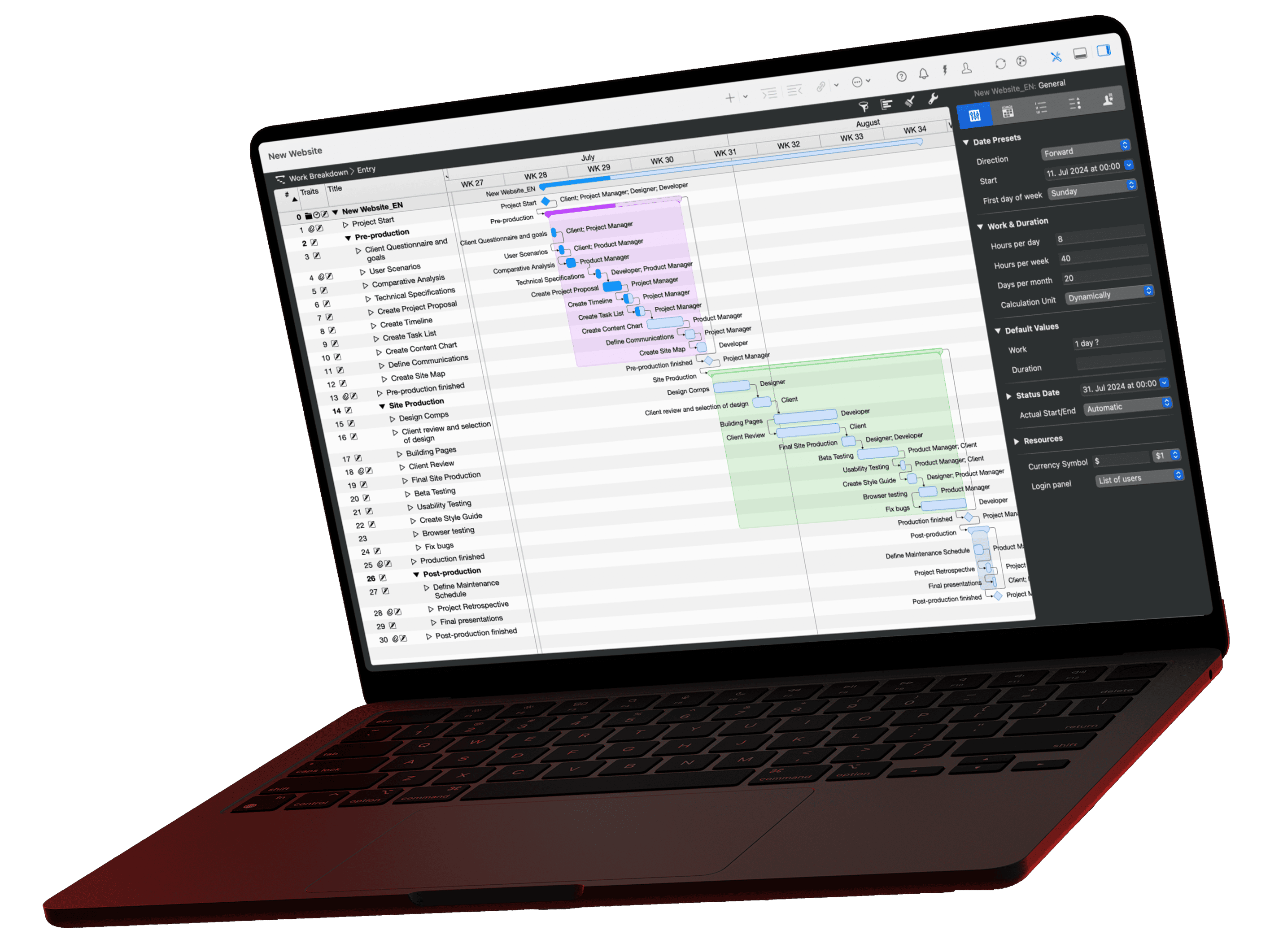
AHO Guideline 9 is the German standard for project management services in construction. It defines five action areas covering documentation, scheduling and cost control. Merlin Project maps those requirements as a native app for Mac and iPad, offline on site and collaborative across the team.
AHO Guideline 9 is the reference work for project management services in the German construction and real estate sector. It has been available in its 6th, fully revised and expanded edition since 2025, bringing refined service profiles, clearer action areas and new requirements for digital processes.
A note on scope: AHO Guideline 9 is a German framework. It is published by the AHO, the Committee of Associations and Chambers of Engineers and Architects for the Fee Schedule, a German body, and it applies to construction projects governed by German law and fee regulations. If you work outside Germany, the mapping below still holds as a practical structure for construction project management, even where the regulatory framing differs.
If you already use the HOAI service phases as your project management scaffold, AHO Guideline 9 adds the depth for the pure project management services, as our guide to project management in architecture sets out in detail. Merlin Project not only reflects these requirements, it actively supports them, and it does so where architects actually work: at the Mac in the office and on the iPad on site.
What the 6th edition of AHO Guideline 9 gives you
The new edition structures project management services along five action areas. It adds expanded requirements for BIM integration, risk management and sustainability across all project phases, and it puts more weight on modern project management methods such as lean management and hybrid planning.
The bibliographic details of the current edition: "Projektmanagement in der Bau- und Immobilienwirtschaft. Standards für Leistungen und Vergütung", 6th, fully revised and expanded edition 2025, 212 pages, Reguvis Fachmedien, ISBN 978-3-8462-1623-1. It is available through specialist booksellers such as beck-shop, and the AHO website carries further information on the guideline series.
The five action areas of AHO Guideline 9
and how they map to Merlin Project
Organisation & documentation
Information, coordination, documentation
Groups, attachments and notes right on the activity
Qualities & quantities
Verifying build quality and quantities
Checklists and activities per work package
Costs & financing
Budget, actual/planned comparison, financing
Budget per activity, earned value analysis
Schedules, capacities, logistics
Scheduling, resources, construction logistics
Critical path and resource utilisation
Contracts & insurance
Contract management, deadlines, insurance
Attachments and deadline milestones per contract
Source: AHO Guideline 9, action areas of project management services in construction.
Your advantage as an architect on Apple devices
Many project management tools today run purely in the cloud: a browser tab, a permanent internet connection, project data on someone else's servers. On the building site, in the basement of a shell construction or on the way to a meeting, that connection is often exactly what you do not have. Merlin Project is built as a native app for Mac and iPad, and that gives you three concrete advantages.
- Works offline. You plan, track costs and manage resources without a connection on site, with the full feature set.
- Native performance. Even large plans with many trades stay responsive on iPad and Mac, without waiting.
- GDPR-compliant without a data processing agreement. Your project data stays on your own devices and in the cloud storage you choose, not on a third-party server. For clients, that argument counts for more every year.
If you already work in the Apple ecosystem, you plan, document and communicate in the same app throughout, at the desk and on site alike.
How to implement the five action areas with Merlin Project
Mapping structured project phases
AHO Guideline 9 divides construction projects into clearly defined phases, from project preparation through to commissioning. In Merlin Project you set these phases up as groups, with assigned work packages, milestones and dependencies. That keeps large, complex projects legible.
Action areas as a work breakdown structure
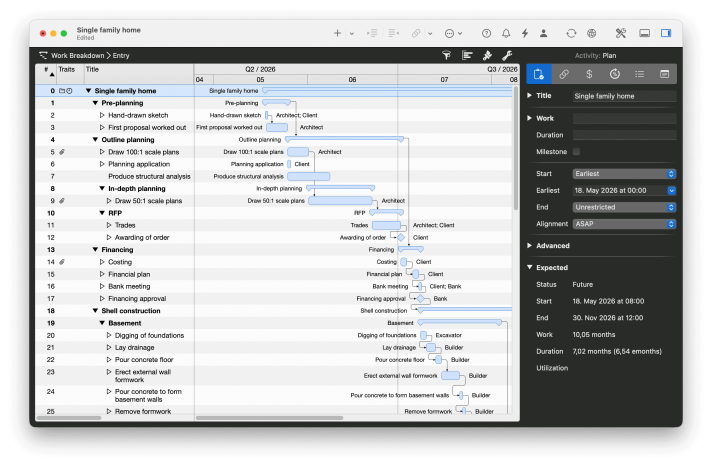
In the work breakdown structure you build the hierarchy by drag and drop. Set the five action areas as the top level and nest the HOAI service phases beneath them. Groups roll up the durations and costs of their child elements automatically, so at every level you see what an action area costs and how long it takes. If you would rather not start from scratch, use the architecture templates.
Schedules and capacities under control
In the schedules, capacities and logistics action area you plan for reliability, with float analysis and resource balancing. Merlin Project shows you the critical path and float at a glance, lets you manage resource utilisation across everyone involved, and lets you test what-if scenarios by changing working times, workloads, durations or float.
Filters for critical path and lookahead
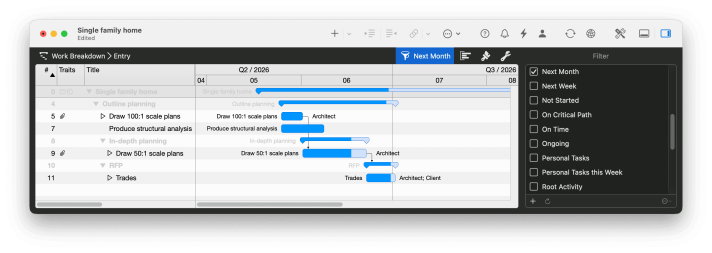
You draw dependencies as connecting lines between the bars, and the critical path is highlighted automatically. Filters such as "On critical path", "This week" or "This month" narrow the plan down to what matters right now. Resource assignment works across projects, so you can see where a site manager is overbooked on one scheme while still having capacity on the next.
Tracking costs transparently
For the costs and financing action area you assign budgets at activity level in Merlin Project, record actual costs and compare them against planned values. Earned value analysis tells you early whether the project is staying within its cost envelope.
Planned and actual side by side
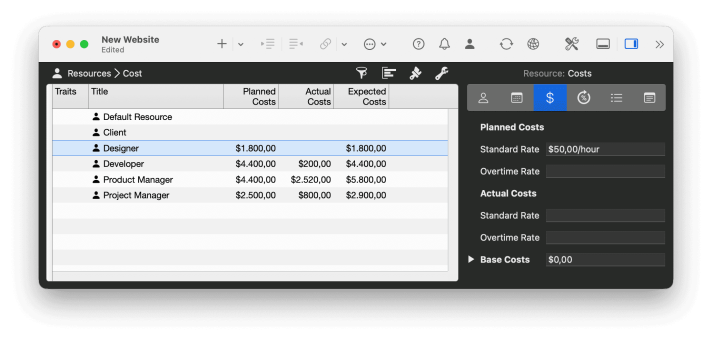
Cost planning distinguishes between planned and actual values. In the planned/actual comparison you lay a baseline over the running plan and see cost and schedule variances immediately, rather than discovering them at the next cost update.
Documentation and reporting
AHO Guideline 9 requires complete project documentation. Merlin Project supports your project communication: attach files and notes directly to your activities, build custom reports and export project status, schedules or resource overviews as PDF, HTML or text for Excel. That way you share what matters quickly and clearly with clients and project participants. The reporting function lets you decide exactly what goes into the site meeting, and puts your own practice logo on the output.
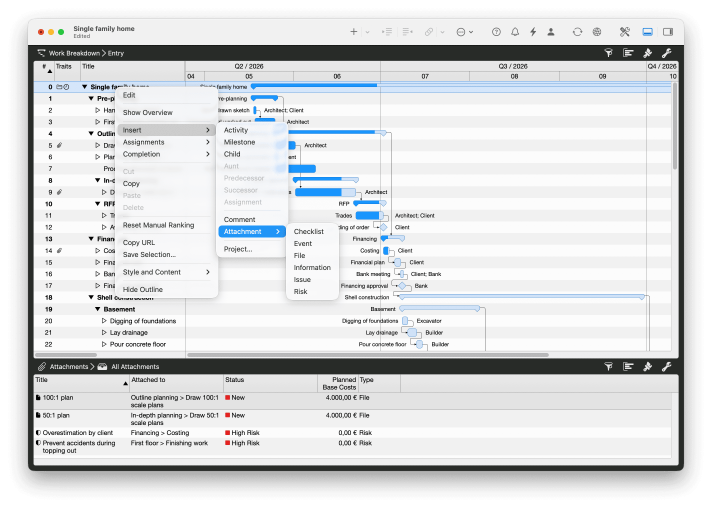
Six attachment types per activity
Every activity carries six types of attachment: files for drawings and photos, checklists for quality assurance, events for appointments, information for URLs and notes, issues for defects, and risks with probability and assessment. Documentation therefore sits on the activity where it arises, not in a separate filing system.
Collaborating directly on iPad and Mac
As an architect you are in constant coordination with site management, specialist planners and the client. Because Merlin Project uses the same project file on Mac and iPad, you can update an activity on site, enter progress or add a note, while your colleagues at the office keep planning on the Mac. MagicSync, the patented synchronisation technology in Merlin Project, reconciles changes from multiple users and devices automatically, without conflict files and without your own server, syncing via iCloud Drive, Dropbox or another supported cloud service.
For everyday construction work that means: a site walk, an updated Kanban status or a newly set milestone all go into the same plan that everyone else sees, whether they prefer the Gantt chart, the Kanban board or the mind map. For documentation, you photograph on site and attach the images to the relevant activities.
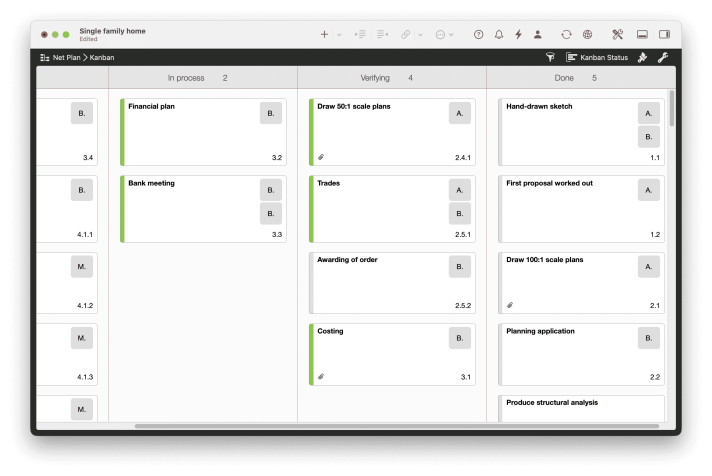
One plan, three views
The same activity appears either as a bar in the Gantt chart, as a card on the Kanban board or as a node in the mind map. On the iPad you update the status directly on site, even without a connection. As soon as you are back online, MagicSync reconciles in the background.
Reports that make the build easier
During construction, the current status is best communicated quickly and directly. From the same plan you generate customisable reports on project status, schedule progress and resource utilisation, and export them as PDF or HTML. That prepares site meetings, client reviews or the handover to the next service phase straight out of the live plan, with no manual copying into a separate reporting document.
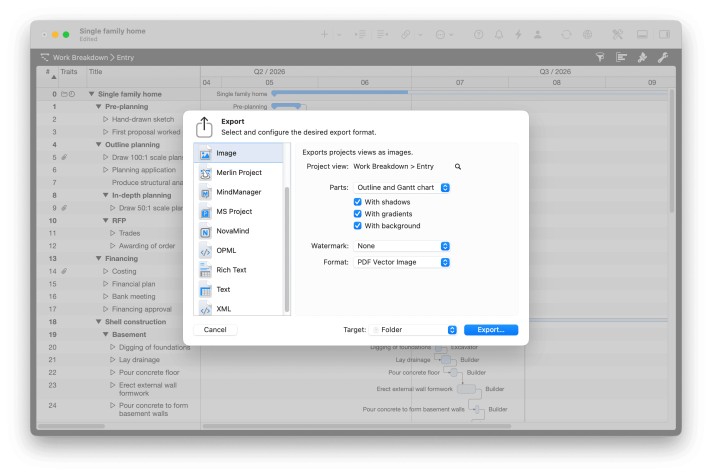
Construction schedules up to A1, with your logo
The reporting function determines what goes into the site meeting. The export delivers construction schedules as PDF vector graphics in A3, A1 or any size you need, plottable and carrying your own logo. HTML, formatted text for Excel and exchange formats such as MS Project are available alongside.
In practice: build yourself an AHO project template
If you regularly run projects to AHO Guideline 9, a project template in Merlin Project pays off. Set up the structure of the action areas, recurring milestones and standard resources once, and they are ready for every new project. That saves setup time and keeps delivery consistent across the team.
Conclusion
AHO Guideline 9 describes the tasks and scope of project management in German construction. Merlin Project helps you put those tasks into practice. With the native app for Mac and iPad you plan projects without an internet connection on site, sync your data across devices when you need to, and produce meaningful reports for communication with clients and project participants.
If you already use Merlin Project, set up your AHO action areas as top-level groups and try the workflow on your next project. If Merlin Project is new to you, get to know it on the product page, look at the use cases for architecture and construction, or read the testimonial from opus Architekten. You can try Merlin Project free for 30 days.
If you have any questions about this blog article or would like to discuss it, we look forward to your contribution in our forum.
Frequently asked questions
Does AHO Guideline 9 replace the HOAI service phases?
No. The HOAI service phases structure the basic services provided by architects and engineers. AHO Guideline 9 describes the project management services performed on behalf of the client, which are commissioned separately in addition to the HOAI. Merlin Project can map both structures in parallel as outline levels.
Does AHO Guideline 9 apply outside Germany?
It is a German framework, published by the AHO and tied to German fee and contract practice, so it is not binding elsewhere. The five action areas nevertheless work well as a practical structure for construction project management internationally, which is why the mapping in this article transfers to projects outside Germany.
Do we need our own server for team collaboration?
No. Merlin Project works entirely locally on Mac and iPad. Synchronisation runs through MagicSync, patented and free of conflict files, via iCloud Drive, Dropbox or another supported cloud service.
How does Merlin Project support the documentation AHO Guideline 9 requires?
You attach files, notes and checklists directly to the relevant activity instead of maintaining them in a separate filing system. Status reports, schedules and resource overviews are exported as PDF, HTML or text for Excel.