

Architecture is one of the most demanding fields of project management. No two projects are alike, dozens of trades interlock, and a single delay can cost weeks. This guide shows how to use established phase frameworks (RIBA in the UK, AIA in the US, HOAI in Germany) as a project-management scaffold, which six methods really hold up in practice, and what a good tool must do to keep building projects on track.
Why project management in architecture is different
Running a building project means more than shepherding a design. You coordinate clients, consultants, authorities, subcontractors and trades. You hold budget, schedule and quality in balance simultaneously. You carry professional liability, and you do all of this on a one-off, a unique piece of work. Every site, every existing structure, every use case is different.
Three properties make project management in architecture firms distinctive:
- Strong dependencies: Structural frame before fit-out, screed before tiles, electrical routing before drywall. A delay in an early trade cascades through every downstream activity. If you don't model these dependencies explicitly, you recalculate by hand, and you almost always miss something.
- High regulatory density: Building codes, planning law, zoning, fire protection, accessibility, procurement rules. The frame is rigid, and the responsibility sits with you.
- Dynamic job sites: Structural surveys reveal hidden risks in existing buildings. Materials become unavailable. The client reassigns a room. No plan survives first contact with reality unchanged.
Above all sits the magic triangle (often called the iron triangle) of quality, cost and time. These three dimensions can't be moved independently of one another: raise the quality on the same budget and deadline, and either the cost climbs or the schedule slips. Pull the completion date forward, and it either costs you (acceleration measures, weekend shifts) or it eats into quality. Every client change request is, at heart, a shift somewhere in this triangle. Project management means making these trade-offs visible, rather than letting them escalate unspoken on the building site.
The underlying truth (which we argued back in 2021) is simple: being an architect means being a project manager. The real question isn't whether you do project management, but how systematically. This guide provides the framework.
Phase frameworks: RIBA, AIA and HOAI as PM scaffolds
Most markets have a recognised phase framework for architectural work. The RIBA Plan of Work 2020 is the UK standard, the AIA Handbook of Professional Practice anchors US practice, and the HOAI defines German Leistungsphasen. It's worth knowing which applies to you and using it deliberately as a project-management scaffold, because each defines responsibilities, milestones and deliverables per phase.
| Phase | RIBA Plan of Work 2020 (UK) | AIA Phases (US) | HOAI Leistungsphasen (DE) |
|---|---|---|---|
| Briefing / requirements | 0, Strategic Definition, 1, Preparation & Briefing | Pre-Design / Programming | LP 1, Grundlagenermittlung |
| Concept design | 2, Concept Design | Schematic Design | LP 2, Vorplanung |
| Developed design | 3, Spatial Coordination | Design Development | LP 3, Entwurfsplanung |
| Technical design | 4, Technical Design | Construction Documents | LP 4-5, Genehmigung & Ausführung |
| Tender / bid | , (within stage 4) | Bidding / Negotiation | LP 6-7, Vergabe |
| Construction | 5, Manufacturing & Construction | Construction Administration | LP 8, Objektüberwachung |
| Handover / in use | 6, Handover, 7, Use | Post-Construction | LP 9, Objektbetreuung |
The labels differ, but the logic is the same. Briefing shapes every downstream choice. Concept and developed design produce the idea and its spatial coordination. Technical design freezes the details that will be built. Construction administration is where plans meet dirt. Handover starts the warranty clock.
Briefing and concept phases: capture requirements cleanly
What happens early decides everything that follows. In the briefing and concept phases you agree the project goal, the spatial programme, and the budget envelope with the client. You develop and compare options. Project management here means capturing requirements in a structured way, making options comparable, and grounding cost estimates in real benchmarks rather than assumptions.
The methodical tool for this is needs assessment, or architectural programming (Bedarfsplanung), which in Germany is codified in DIN 18205. Its goal: to compile the client's or user's needs, objectives and requirements methodically at the earliest possible point, as the yardstick for every later decision. Worth knowing: under the German HOAI fee schedule, needs assessment is not a basic service of design work but a special service. Whoever delivers it should therefore agree and invoice it separately. Cleanly documented requirements are also the best defence against the creeping scope expansion that otherwise routinely turns into a dispute in the construction and handover phases.
Common failure modes: requirements that live only in someone's head or in an email thread; options that aren't benchmarked against the same criteria; cost estimates built on optimism.
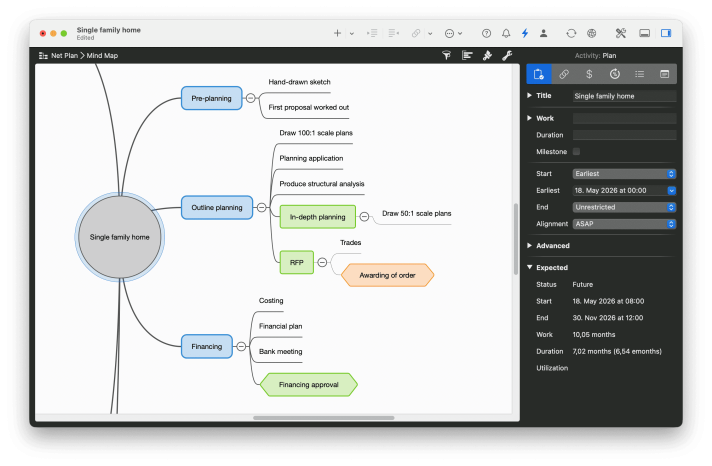
Mindmap as the bridge
Merlin Project's mindmap view is purpose-built for the early phases. Collect rooms, uses and requirements associatively, then convert the mindmap into a full project plan with one click. Branches become work packages, nodes become activities, no retyping.
Technical design and construction documents: freezing detail
Once the concept is signed off, the job shifts from creating to coordinating. Technical design (RIBA stage 4 / AIA Construction Documents) produces the drawings and specifications that will be procured and built. Many documents, many reviews, many change loops. The PM lever here is discipline: version everything, document every sign-off, agree firm delivery windows with structural, MEP and building-physics consultants.
The rawest nerve is sign-offs. "I never approved that" is one of the most expensive sentences in any building project: approvals that can't be traced regularly turn into five- and six-figure disputes and, in the worst case, into the architect being dismissed. The countermeasure is the decision memo: a short, structured document that states the topic, the impact on quality, cost and time, a decision deadline and a signature line. It creates a defensible basis for the decision, actively supports clients who aren't building experts, and records the outcome verifiably. That same documentation is later the foundation for fee variations. For change requests after the design is signed off, the order is fixed: first an effort estimate, then the decision memo, then implementation in the drawings. Never the other way around.
Tender and procurement: where errors get expensive
Tender documents turn the design into a contract. Missing items end up as variations. Unclear specifications end up as disputes. Project management means systematically checking completeness and surfacing trade dependencies in the tender pack, not after award.
Construction administration: where plans prove themselves
Construction administration is the operational heart of architectural PM. Schedule, site and reality meet here. You steer dates, inspect quality, manage defects, keep everyone informed. A live schedule is not a nice-to-have, it's a working tool.
Handover and post-construction
The project doesn't end at handover. Defect-liability periods typically run four to five years, depending on jurisdiction. Documentation that was captured carefully during construction pays back every month after handover.
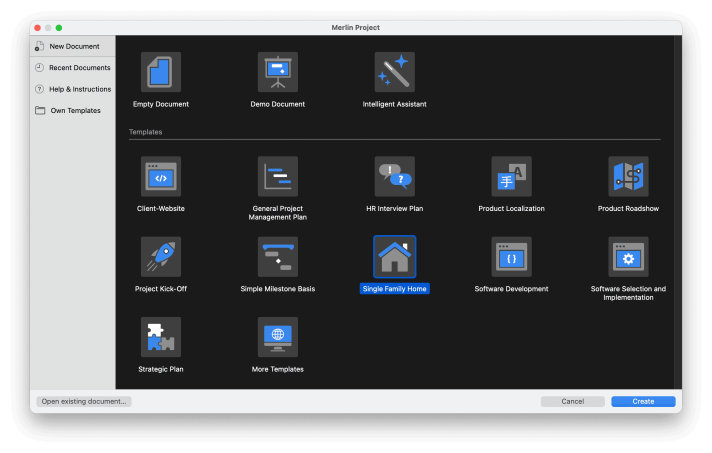
Templates for shell, fit-out and MEP
Starting every project from zero wastes hours. Our architecture templates ship pre-built project structures for typical building projects, shell, fit-out, MEP. You adapt the template to the project at hand instead of inventing the structure over again.
The six core PM methods for architectural projects
A phase framework alone doesn't build a building. You need methods that bite inside every phase. Six techniques consistently prove themselves in the architecture context.
1. Work Breakdown Structure (WBS)
The WBS decomposes a building project top-down into ever finer work packages: project → trades → sub-deliverables → individual activities. It answers the question "What needs to be done?" before you answer "When?".
A good WBS is complete (nothing missed), non-overlapping (nothing double-counted), and internally consistent (comparable granularity on a single level). The classic WBS approach has its roots in plant engineering but transfers cleanly to architecture.
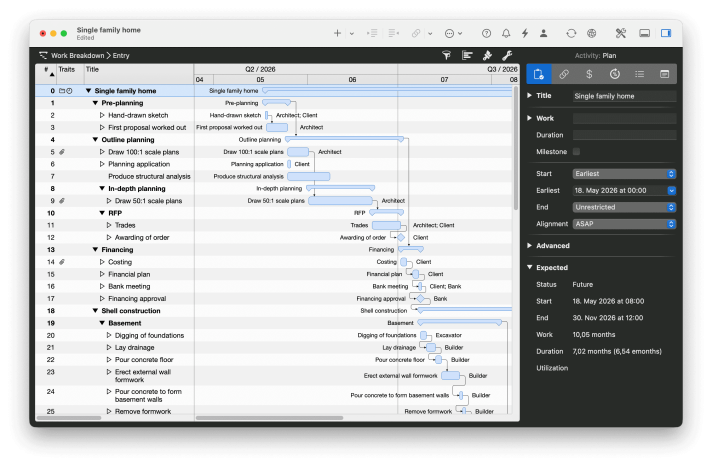
WBS in Merlin Project
With the work breakdown view in Merlin Project, you build the hierarchy with drag-and-drop. Groups automatically roll up the duration and cost of their children, you see what a trade costs and how long it takes at every level of the tree.
2. Gantt chart and construction schedule
The Gantt chart is the workhorse of construction scheduling, for good reason. It renders activities as bars on a timeline and makes dependencies visible at a glance. Four dependency types cover almost all building logic: Finish-to-Start (shell finishes → fit-out begins), Start-to-Start (parallel start), Finish-to-Finish (shared end date), and the rarely-used Start-to-Finish.
The critical path is the longest chain of dependent activities. A delay on the critical path delays the entire project; delays off the critical path don't. Knowing the critical path tells you where to push and where you have slack.
An older but still relevant piece on construction schedules goes deeper into the day-to-day practice.
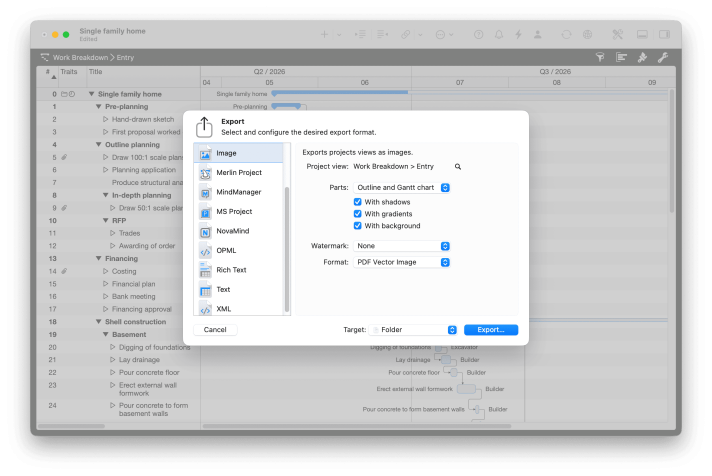
Gantt with printable PDF export
In Merlin Project, dependencies are connection lines between bars. The critical path is marked automatically. Our detailed Gantt guide walks through the mechanics step by step. And the PDF export produces construction schedules in A3, A1 or any custom size, plottable, with your firm's logo, no manual cleanup.
3. Milestones
Milestones are activities without duration: hard anchor points in the project. "Planning application submitted", "Permit granted", "Shell complete", "Practical completion", events like these make the project legible to non-experts, tie payment schedules to progress, and make forward motion measurable.
Rule of thumb: five to ten milestones per project phase is enough. Turn every small event into a milestone and you generate noise; use too few and you notice deviations too late. Our dedicated article on milestones covers typical patterns and pitfalls.
4. Kanban for trade coordination
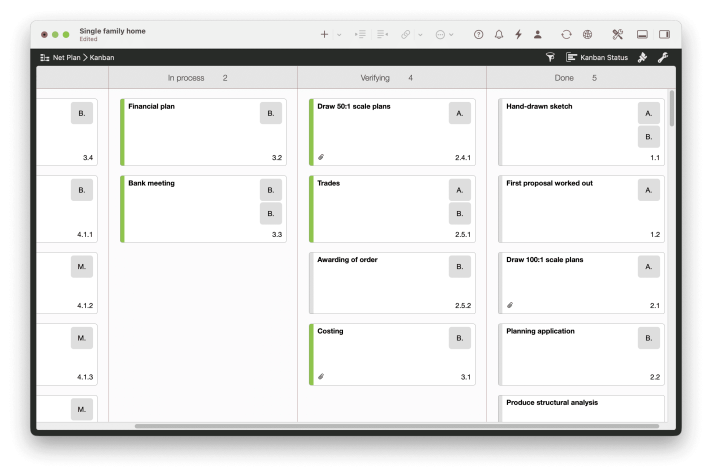
Kanban complements the Gantt plan; it doesn't replace it. While the Gantt schedule governs the temporal flow, a Kanban board captures the current state: which defects are open? Which variations are awaiting approval? What came out of last week's meeting that isn't yet closed?
Kanban's strength: every participant sees at a glance what is on their plate now. Columns like "Open, In progress, Review, Done" are usually enough. For construction administration, Kanban is particularly useful because it consolidates defect lists and open items into one living view.
Kanban on iPad and Mac
The same activity in Merlin Project shows up either as a bar in the Gantt or as a card on the Kanban board. The Kanban guide explains the column logic in depth. On the iPad, you update the board on site, offline, without a mobile signal.
5. Resource and cost planning
Resources in architectural projects are people (project architects, technicians, site managers), external partners (structural, MEP, subcontractors) and equipment (cranes, scaffolds, site huts). Solid resource planning answers three questions:
- Who or what is committed when?
- Where are the bottlenecks (overallocation)?
- Where is free capacity (underutilisation)?
Costs follow the same logic in currency rather than hours. Every activity has a planned cost (budget) and an actual cost. The plan-vs-actual comparison is a central steering instrument, in construction administration it often decides whether you keep going or renegotiate.
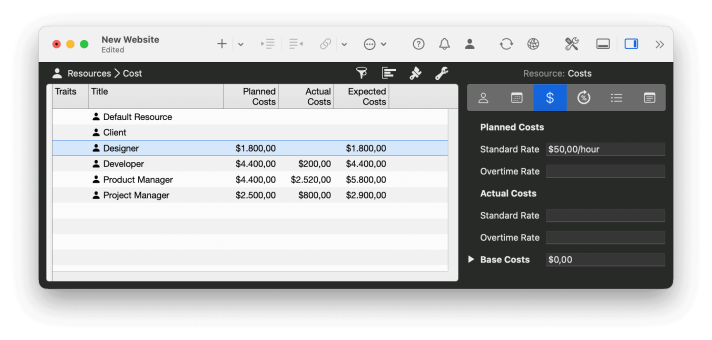
One thing stands out in architectural practice: resources are rarely locked to a single project. A site manager typically runs three to five sites in parallel. A structural engineer works for several firms. A drywall sub serves ten clients at once. A PM who only watches their own project sees the overbooking the day it happens. A PM who watches utilisation across the portfolio spots, three weeks out, that site manager X is scheduled on three sites in the same calendar week and can rebook before anyone is actually waiting.
Subcontractors make the problem harder: you don't have visibility into their order books. The only lever that really helps is planning with reserve: lock dates with the sub as early as possible, build in buffer, and check in at two milestones before execution ("are we really still on for 14 May?"). Reserve made explicit in the plan stops being argued about under time pressure.
Resources and costs across multiple projects
Merlin Project shows resource utilisation across projects. You see where a site manager is overbooked in project A while still having capacity in project B. The tutorials on resource assignment and cost planning walk through the process step by step.
6. Risk management and attachment handling
Risks in architectural projects are as varied as the projects themselves: existing-structure risks (what emerges when you open up the wall?), supply risks (material shortages), weather risks, permitting risks, financing risks. Professional risk management means identifying the material risks, rating each by likelihood and impact, and defining a mitigation or contingency response for the critical ones.
Documentation runs in parallel: photos, approvals, email threads, minutes, cost estimates. If you can't find the record attached to an activity in two clicks, you lose serious time the moment a dispute arises.
Six attachment types per activity
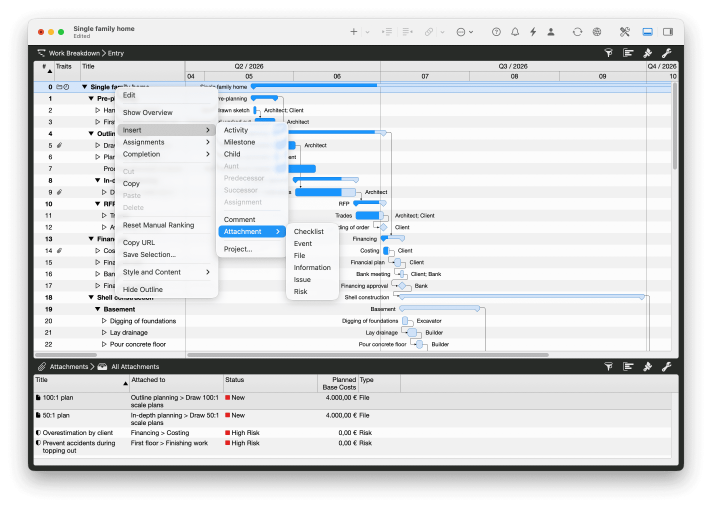
Every activity in Merlin Project can carry six attachment types: files (drawings, photos), checklists (quality sign-offs), events (dates), information (URLs, notes), issues (defects) and risks (with likelihood and rating). Everything lives on the activity where it actually happened, not in a separate document management silo.
Rolling-wave planning: a weekly plan and a 3-week look-ahead for the site
The full construction schedule is set. But on site, superintendents don't think in months, they think in weeks and days. North American construction has a long-standing practice for this that transfers cleanly to European building projects: rolling-wave planning with a 3-week look-ahead.
The idea is simple. You operate on three time horizons at once:
| Horizon | Focus | Detail | Owner |
|---|---|---|---|
| Now (0-7 days) | Execution | Day-by-day | Site manager |
| Next (7-21 days) | Tactical prep | Day / activity | Project manager |
| Full (21+ days) | Strategic schedule | Weeks | Project control |
The 3-week look-ahead is the hinge between daily work and the master schedule. Every week, it answers the same three questions:
- What's coming up in the next 21 days?
- Which prerequisites must already be in place (materials, permits, subcontractor commitments)?
- Where is a bottleneck forming that the master schedule doesn't yet show?
Teams that introduce this rhythm typically spot problems two to three weeks earlier, often in time to resolve them without affecting the date. Without the look-ahead, those problems tend to surface only as delays.
In practice that means a weekly site meeting built around the look-ahead, not around status ("what was done last week"), a forward view: "What has to happen in the next 21 days for us to stay on track?"
Rolling wave in Merlin Project
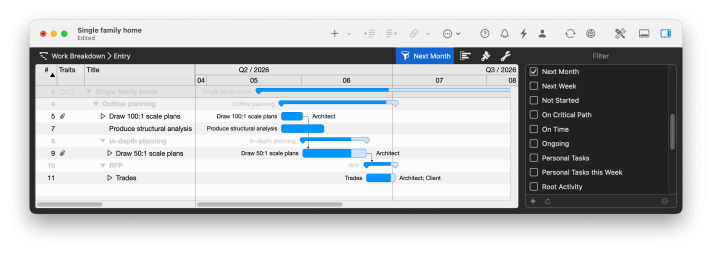
In Merlin Project you set up your own filters for different time frames, for example "This week", "3-week look-ahead" and "Next 90 days". One click switches between the saved views, so you see only the activities relevant to the current perspective, without scrolling through the entire plan.
What a good PM tool for architects must do
The methods are tool-agnostic. But what tools actually cut it? Spreadsheets fail at dependencies. Microsoft Project is powerful but Windows-bound with no first-class iPad app. Generalist work-management tools from the software world (Jira, Asana, ClickUp) can't render a construction schedule you can plot. What does an architectural firm actually need?
Many of these sound like basics, and yet most tools stumble precisely on one of them. Merlin Project has been built for this use case for more than twenty years. The iPad app brings the full feature set to the building site. MagicSync handles patented synchronisation over iCloud, Dropbox and other cloud providers. The reports produce printable PDFs at any size. And the MS Project integration reads and writes MS Project XML natively.
In comparison: the typical tool options for building projects
Read the rooms where project managers talk shop and the same comments keep coming up about the classic PM tools, often starker than the vendor pages suggest. Two patterns dominate: Microsoft Project is powerful but oversized ("too many features for 80% of users", "the learning curve is so steep that team adoption fails inside three months"). Excel remains popular despite everything, simply because it's simpler than most "real" PM tools. Generalist cloud tools, Asana, Monday, ClickUp, hit their ceiling on building projects: they are built for knowledge work, not for time-critical trade dependencies.
The table below summarises what each actually delivers in an architectural context:
| Requirement | Excel | Microsoft Project | Monday / Asana | Merlin Project |
|---|---|---|---|---|
| Real Gantt with critical path | No | Yes | Limited | Yes |
| Offline on site | No | No (cloud) | No | Yes (native iPad) |
| Print-quality schedule (A3/A1) | No | Yes | No | Yes |
| MS Project import/export (XML) | Limited | Native | No | Native |
| Data protection friendly (no processor agreement) | Yes | On-prem only | No (US cloud) | Yes (local data) |
| Multi-user sync without conflicts | No | Server edition only | Yes (cloud) | Yes (MagicSync) |
| Onboarding time for a new team member | 5 min | 2-3 days | 2-4 hrs | ~1 hr |
Where Excel falls short, MS Project can close the gap, at the cost of a steep learning curve and a feature depth that 80% of architectural firms never fully use. Cloud tools like Monday or Asana are easier, but they can't compute the time-critical logic of a building project. Merlin Project sits in this matrix as an architecture-specific alternative: equally capable on the time model, but with an iPad app for the site, local data storage, and an onboarding effort measured in hours rather than days.
When the architect becomes the project manager
Listen in on architects talking among themselves and a pattern emerges: many of them are project managers without being labelled or paid as such. They carry schedule, budget and trade-coordination responsibility on top of design and delivery, usually without PM training, without dedicated project-support staff, and without a tool built for how they think. The recurring complaint: the formal project manager the client brings in can't read the drawings.
Three patterns show up again and again:
- The role gets added on. Clients expect the architect to run the project, not just design it. At the same time there's rarely a role definition, a billing line for PM services, or a clear boundary between design and coordination.
- The tools are wrong-sorted. Architects live in CAD, BIM and PDF markup, Revit, ArchiCAD, AutoCAD, Bluebeam. Generic PM tools (Monday, Asana, Trello) feel spreadsheet-heavy and distant; they are rarely introduced well, and even more rarely adopted. The usual fallback: back to Excel.
- Invisible work. Design output is visible and celebrated. Project leadership is only noticed when it fails. Anyone doing both regularly has to actively surface their PM contribution, to clients, to partners and to themselves.
The practical consequence: a PM tool in an architecture firm has to fit how architects think. That means phase-aware (RIBA stages, AIA phases, HOAI Leistungsphasen, not generic sprints), drawing-centric (plans and PDFs attached to the activity, not in a separate DMS), mobile on site (construction administration isn't an office job), and unobtrusive to learn (or the team drifts back to Excel).
Fees and scope: the underrated PM task
One topic runs through international architect communities more strongly than any other: underbidding and the quiet expansion of scope that follows. The pattern is familiar. A competitor wins the tender with a fee that doesn't actually cover the work. The client chooses on price. The winning firm trims review cycles, skips iterations, quietly absorbs the overhead in construction. Quality suffers, or the firm takes the loss.
Project management is the lever that makes two things possible. First, a realistic fee, because a clean work-breakdown structure shows which services actually have to be delivered instead of guessing. Second, scope control, because every client change request can be attached to a specific activity and quantified in hours. "Can you take another quick look at this?" turns into a documented scope change that is either priced or explicitly flagged to the client as additional service.
Three practical mechanisms that architects recommend to one another:
- Budget by phase, not by project. Split the fee envelope across the work stages. If you've already burned 40% of the fee in stage 3, you know weeks before construction administration that a renegotiation is due.
- Track hours against activities, not projects. Once you know a typical detail set takes your team six hours, you can quote seriously instead of playing roulette with the market.
- Keep a formal change log. Every client change request is dated, recorded on the activity and either accepted as included or offered as additional service. Do this consistently and you end the project with a clean case, not a fight.
A real-world example: OPUS Architekten
One concrete example from practice: the firm OPUS Architekten in Darmstadt has been working with Merlin Project for years. Project lead Anke Mensing puts it like this:
"Architecture is always a team performance. Merlin Project's individual, versatile capabilities let us respond flexibly to change throughout the entire project lifecycle, and absorb delays through rapid adjustments."
The phrase to pay attention to is "respond flexibly and absorb delays". That's the real test of any PM tool: not how well it draws an ideal plan, but how quickly it adapts to the inevitable deviation. Somebody on a construction site reporting a week's slip doesn't want to go back to the office and recalculate for two hours, they want to drag a duration on the iPad and see what it means for the downstream trades.
Voices from practice: what project managers actually say
Read along in international project-management communities for a while and a handful of recurring themes become clear. The quotes below are paraphrased, often-repeated observations from conversations among practitioners, not marketing language, but the way PMs actually talk to each other. They map surprisingly well onto daily life in architecture firms:
"I'm responsible for everything but in control of nothing."
The line captures the core paradox of project leadership: you carry the liability and the accountability without mixing concrete, hanging drywall or laying tile yourself. Your levers are the plan, communication and escalation. The counter-move is to steer the plan well enough that you never end up there without control.
"If everything is a priority, then nothing is."
Building projects fire dozens of topics at you at once. Picking three that really matter this week, and deliberately setting the others aside, delivers more by Friday than fighting on every front. The Gantt isn't there to keep every task simultaneously in focus, it's there to tell you what's next and decisive.
"No one notices what I do until I stop doing it."
Project leadership is invisible when it works. Good documentation isn't just protection in a dispute; it's a record of your work for everyone else. A clean construction schedule, tidy minutes, traceable approvals, all of that is also a statement of what you delivered.
"Dictate a date to a team and it's your date they miss. Let them name the date and you've got a planning partner, the conversation is different."
A simple but powerful lever: ask subcontractors and consultants for their realistic date, not one you hand them. A date someone named themselves carries different weight. It doesn't solve every scheduling problem, but it shifts the conversation toward shared ownership.
"Most big PM tools have such a steep learning curve that three months in, half the team is back on Excel or paper."
A tool that doesn't survive the day-to-day is useless. The most important tool property isn't feature depth, it's adoption. A tool that lets your new technical drafter be productive in an hour beats a tool that, after two days of training, has already lost three-quarters of the team.
The architect communities themselves add observations that translate directly into office practice:
"Nobody reads drawings. The project manager the client brings in often can't decipher the plan."
This is the working reality for many architects: the formal PM role is filled, but the expertise to read the drawings sits with the architect. Whoever accepts that ends up leading the project in fact, usually without being paid for it. A PM tool that carries drawings natively on the activity (rather than in a separate DMS) cuts this friction significantly.
"The principal underbids to win the cheaper clients, then trims services to make it work. The client gets what they paid for."
This market diagnosis can't be fixed by a tool alone. But a clean work-breakdown with an hour budget surfaces underbidding internally, before a project becomes a burden, and forces more honest pricing on the next proposal.
Five actions for your next project
Theory is cheap. Five things you can put to work on Monday:
-
Model dependencies before dates. Before you set a single date, model the logic: what comes before what? Which activities share inputs? A correctly linked project calculates dates automatically, a fully-dated but unlinked project forces you to recalculate by hand on every change.
-
Set hard milestones, no more than ten per phase. "Permit granted", "Shell complete", "Practical completion" are the anchor points your client uses to read progress. Place them deliberately and sparingly. Every extra milestone dilutes the picture.
-
Track budget by trade digitally. Keeping budget and actual costs in a separate spreadsheet creates two sources of truth and eventually a contradiction. Put planned and actual cost directly on the activity, that way you see immediately where it's pinching.
-
Put an offline tablet on the site. An iPad on the construction site, with the current schedule available offline, transforms construction administration. You log defects at the moment they come up, with a photo, linked to the activity, with a due date. The next site meeting runs on real data instead of your memory.
-
Run the weekly meeting off a Kanban board. A Kanban board on the meeting-room screen shows what's open, what's in progress, what's blocked. Fifteen minutes per project is enough. Everyone sees the same state, nobody argues about which list is current.
Conclusion: framework plus methods plus tool
Architectural project management works when three things come together. First, a phase framework that defines responsibilities and milestones, RIBA in the UK, AIA in the US, HOAI in German-speaking markets. Second, methods that bite in every phase: WBS, Gantt, milestones, Kanban, resources and costs, and risk and attachment handling cover the vast majority of real-world needs. Third, a tool that implements those methods cleanly, with a real computed Gantt, offline capability, print-quality PDFs and multi-user sync.
With all three, you don't just steer projects when things go to plan. You steer them when they don't, which is the normal case.
You can try Merlin Project free for 30 days. The full feature set is unlocked during the trial, you can build an architectural construction schedule on your first attempt, and the pre-built templates take care of the cold start.
If you have any questions about this blog article or would like to discuss it, we look forward to your contribution in our forum.
Frequently asked questions
How do I structure a construction schedule around RIBA stages or HOAI Leistungsphasen?
Use the phase framework (RIBA 0 to 7, HOAI 1 to 9, or the AIA phases) as the top level of the work breakdown. Attach the concrete work packages under each phase and link the construction activities with finish-to-start dependencies. Hard milestones like "permit granted" or "shell complete" mark phase transitions.
What PM software fits an architecture firm without the complexity of MS Project?
A building project needs a real Gantt with a critical path, multi-user sync and offline access on the iPad. Excel fails at dependencies, MS Project overwhelms teams with complexity, generic cloud tools like Asana or Monday cannot produce plottable construction schedules. Merlin Project is built for this use case and typically takes about an hour to learn.
How do you run construction PM on site without an internet connection?
Local apps like Merlin Project work fully offline on Mac and iPad. Sync happens automatically as soon as the device is back online. Cloud-only tools struggle on site, because printed PDFs are already out of date by the next site meeting.
How do architects deal with underbidding and scope creep?
Two levers help. Budgeting per phase instead of per project surfaces overruns weeks earlier. An hour budget per activity instead of per project produces realistic fee quotes. Every client change request is logged on the activity and either priced in or issued as a paid additional service.
What is the difference between a Work Breakdown Structure (WBS) and a Gantt chart?
The WBS decomposes the project top-down into work packages and answers "what needs to be done". The Gantt chart then fixes when the activities run and how they depend on each other. WBS comes first, the Gantt builds on top of it.
How do you coordinate subcontractors across multiple construction sites?
Track resource utilisation across the portfolio, not per project. That way you spot the overbook weeks before a site manager is scheduled on three sites in the same week. For subcontractors: lock dates as early as possible, write reserve into the plan, and reconfirm the commitment two milestones before the handover.
How do I document client sign-offs and change requests in a legally defensible way?
Use a decision memo for every material decision: a short document with the topic, the impact on quality, cost and time, a decision deadline and a signature. For change requests after the design is signed off, the order is effort estimate first, then the decision memo, then implementation. This avoids the costly "I never approved that" and at the same time creates the foundation for fee variations.
