Almost every project has a risk register, even if it only lives in the project manager's head. You create it at the kickoff, and then the plan runs away from it. Weeks later a risk still says "did not occur" although the affected tasks have long been behind schedule. When did you last put your register next to the plan?
As long as register and plan drift apart, you only hear about a risk once it has occurred. This guide brings the two together in five steps, from theory to implementation in Merlin Project. First, let's look at what the effort gets you.
Calculator in this guide
Classify your risks with three questions
The calculator places each risk in your own 5×5 risk matrix and names the response and the matching risk class for Merlin Project. Export the finished matrix as an image for your weekly meeting.
Go to the calculatorWhat's in It for You
A well-kept register takes time. You get that time back in four places.
- React earlier. A response only works while there is time left. Once the task is behind schedule, the best you can do is limit the damage.
- Justify contingency. You derive budget and schedule contingency from assessed risks instead of adding a flat ten percent. Every client sees what it covers.
- Decide on responses with numbers. A response pays off if it costs less than the expected damage. With probability and impact in the register, you work it out.
- Learn from projects. A closed risk with cost, delay and lesson provides the starting value for the next project.
The sample project that runs through this guide shows what reacting earlier is worth. Three of its risks have already occurred. For the soft subsoil, the contingency plan was already in the register, and the team could act at once. For the fire protection concept, the consultation with the certified reviewer only came after submission. For the shell construction on floor 2, nobody tracked the risk; the register still lists it as "did not occur".
The Theory: What Risk Management Is
"Risk management is project management for adults."
Tim Lister, IEEE Software, 1997
In 2003, Lister and Tom DeMarco made the line a chapter heading in their book "Waltzing with Bears". Planning like an adult means accepting that not everything goes to plan and settling beforehand what happens then. For the two of them, risk and benefit belong together: "Risks and benefits always go hand in hand." If you take no risk, you never break new ground and earn little from it. We presented their simulation tool Riskology in 2018.
What a risk is. The PMBOK Guide of the Project Management Institute (6th edition, 2017) defines a risk as "an uncertain event or condition that, if it occurs, has a positive or negative effect on one or more project objectives." The ISO 31000:2018 standard puts it more briefly: "effect of uncertainty on objectives." British risk expert David Hillson condenses both into a formula: risk is "uncertainty that matters", uncertainty that counts for the objectives. All three definitions include opportunities and describe something possible: once a risk occurs, it becomes an issue. More on this in the glossary under risk and risk management.
What you can know. In a 2002 press conference, then US Secretary of Defense Donald Rumsfeld distinguished "known knowns", "known unknowns" and "unknown unknowns". The register holds the known unknowns: you know the subsoil may be worse, but not yet whether it is. Only a general management reserve protects against the completely unexpected, and experience from completed projects shows how large it needs to be.
The process. The PMBOK Guide and ISO 31000 describe risk management as a cycle of five steps, with slightly different terms. The numbered sections of this guide follow it.
Identify
Which risks exist, and what do they depend on?
Assess
How likely, how expensive, how late?
Control
Avoid, mitigate, transfer or accept
Monitor
Compare register and plan regularly
Learn
Record the outcome, update the values
Step 5 feeds step 1 of the next project
Merlin Project, the MCP Server and the Sample Project
Merlin Project manages risks as a separate attachment type. A risk is attached to a task, an assignment or a resource and carries these fields: title, Risk Group, Risk Class, Probability, the impact on scope, cost and deadline, Reported by, In Charge, Risk Description and Actions. For the outcome, Did Occur, Cost, Delay and Lessons Learned are added. The Attachments > All Attachments view lists all risks of a project as a register; the page on attachments in Merlin Project gives an overview of all attachment types, and the learning chapter on risk management covers the basics.
The Merlin Project MCP server gives an AI such as Claude read access to these fields and to the task the risk is attached to, including critical path, slack and plan versus actual variance. This is the basis for all prompts in this guide: the AI compares what the register says with what the plan shows. You activate the server per project with the "AI Tools" button in the toolbar; the MCP documentation describes the setup. The article on digital sovereignty and privacy explains which plan data goes to a cloud provider.
All examples come from our sample project Townhouse 21, a mixed-use apartment building with 31 units that a fictional architecture firm is building for an investor. We constructed the project for this guide; it is in the interior fit-out stage. Its register contains ten risks:
| No. | Risk | Attached to | Prob. | Class |
|---|---|---|---|---|
| 1 | Subsoil Softer Than in Survey | Earthworks & Excavation | 30 % | Emergency plan, occurred |
| 2 | Follow-up Requirements on Fire Protection Concept | Fire Protection Concept | 40 % | Reduction, occurred |
| 3 | Bad Weather and Frost Delay Shell Construction of Upper Floors | Shell Walls Floor 2 | 50 % | Reduction |
| 4 | Structural Reviewer as Sole External Bottleneck | Structural Review | 15 % | Emergency plan |
| 5 | Residual Screed Moisture Delays Flooring | Fit-out Ground Floor | 60 % | Reduction |
| 6 | Drywall Subcontractor Failure | Interior Fit-out | 25 % | Emergency plan |
| 7 | Custom Requests from Penthouse Buyers | Fit-out Attic Floor | 70 % | Reduction |
| 8 | Blower-Door-Test Failed | Blower-Door-Test | 20 % | Reduction |
| 9 | Follow-up Requirements at Fire Inspection | Fire Inspection | 10 % | Accepted |
| 10 | Price Increase on Change Orders | Project | 50 % | Reduction |
1. Identify Risks: You Do Not Start from Zero
The cheapest place to find risks is your own experience: what occurred in comparable projects is likely to happen again. The plan itself reveals further candidates, such as tasks on the critical path without slack, dependencies on a single person or company, and milestones where several strands converge. What no document records, the site management, specialist engineers and subcontractors know; a SWOT analysis or the headstand method brings it out in a workshop. Start with experience and the plan, and you capture most risks in hours; the workshop only adds what neither of them shows.
In Merlin Project, attach each risk to the task it affects, not generically to the project. Only then can the AI later see whether the task is behind schedule, lies on the critical path or has slack. Take the initial register from the project knowledge base: its chapter "Risks and Learnings" contains recurring risks with frequency, typical impact and a proven response. The AI checks the plan structure with the prompt below.
In Our Sample Project
The plan of our sample project reveals two such spots directly. The structural review depends on a single external structural reviewer; if he drops out, the building permit stalls (risk 4). The blower door test and the fire inspection are inspections that may require rework (risks 8 and 9). All three risks are attached to their task. Only the price increase on change orders (10) is attached to the project, because it affects every open trade.
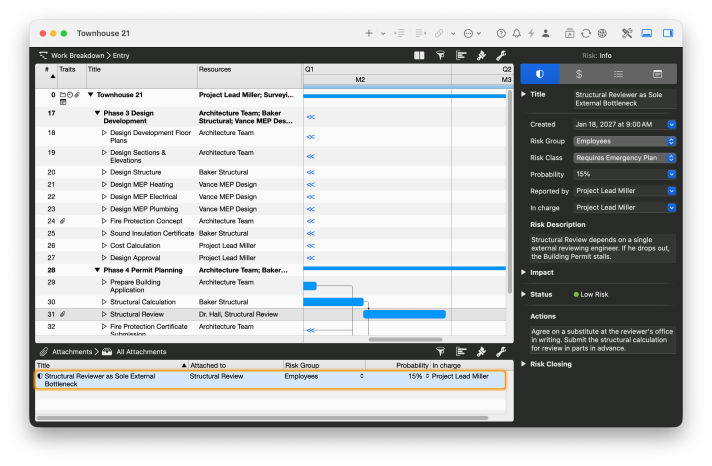
A risk on its task
The structural review is selected. The Resources column shows only the external structural reviewer, and below appears the risk attached to this task.
Try the Prompt Yourself
Read the current project from Merlin Project. Find places in the plan
where a risk is likely: tasks on the critical path without slack, tasks
worked on by only one external resource, milestones where several
strands converge, and acceptances or inspections that may require
rework. Compare the list with the existing risk attachments and name
the places that do not have a risk attached yet.
Risk Categories: Order in the Register
You can keep track of a register with ten risks, but not one with fifty. Categories bring order: they show gaps at a glance, assign responsibility by topic and make registers comparable across projects. You can sort risks along several dimensions; a good register uses at least two of them.
| Dimension | Values | What you need it for | In Merlin Project |
|---|---|---|---|
| Source | technical, financial, personnel, business, external | Assign responsibility, find gaps | Risk Group |
| Impact | schedule, cost, scope and quality | Assess, size the contingency | three impact fields |
| Type of uncertainty | variation, event, rework | Model correctly, for example in Monte Carlo | Risk on task, range in fields |
| State of knowledge | known, known unknown, unknown unknown | Separate register from management reserve | Register and reserve task |
| Direction | threat, opportunity | Use opportunities deliberately | custom risk group "Opportunity" |
| Location in project | phase, trade, task | Comparison across projects | Task, tags and fields |
Teams most often sort by source: where does the risk come from? For this, the PMBOK Guide proposes a risk breakdown structure, in its example with technical, management, commercial and external risks. Merlin Project comes with a similar classification in five risk groups:
- Technical: design, construction methods and materials, such as subsoil, fire protection, building physics and interfaces between trades.
- Financial: prices, change orders, financing and payment defaults.
- Employees: people and capacity, meaning the loss of key people or subcontractors and overload.
- Business: the relationship with client and customers, such as change requests, contracts and acceptance.
- Global: external influences the project does not control, such as authorities, laws, market and supply chains.
Which risks fall into these groups depends on the industry. For software projects, DeMarco and Lister named five core risks in "Waltzing with Bears" that lurk in almost every project:
- a schedule that is too tight from the start
- growing requirements
- staff turnover
- a specification the parties cannot agree on
- lower productivity than assumed
In construction, the core risks look different. The knowledge base shows which ones apply in your industry; the PM Study 2026 names four typical levers for construction projects.
In Merlin Project, you select the Risk Group in the risk inspector. You create custom groups such as "Authority", "Supplier" or "Weather" in the project settings under Value Lists. Save the groups in your project template so that all projects use the same categories; otherwise you cannot compare registers later. The assessment fields are designed for threats. Record opportunities with a custom group "Opportunity" and describe the potential benefit in the Risk Description. For phase or trade, use Tags and custom Fields on the task.
In Our Sample Project
Technical
Subsoil, fire protection, building physics, interfaces
Financial
Price increases, change orders, payment default
Employees
Loss of key people or subcontractors, overload
Business
Client, buyers, change requests, contracts
Global
Authorities, laws, market, supply chains
The distribution reveals blind spots. In our sample project, six of ten risks are technical and one is financial. For an investor project with 31 units, a striking amount is missing on the business side: sales risks, buyers defaulting on payments or disputes at acceptance. Nobody asked that question at the kickoff.
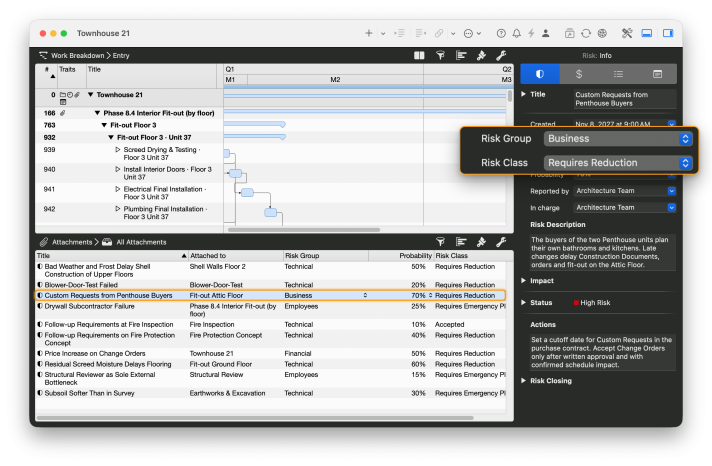
Risk groups in the register
With the Risk Group column, you see the distribution directly in the register. The custom requests from the penthouse buyers are the only risk in the Business group.
Try the Prompt Yourself
Read all risk attachments in the current project with their risk group
and the task they are attached to. Show me the distribution by risk
group and by project phase. Which groups or phases are noticeably
underrepresented given the size and type of the project? For each gap,
suggest two specific risks I should check.
2. Assess Risks: Probability, Impact and Merlin's Points
Qualitative assessment estimates two quantities: the probability that a risk occurs and the impact if it does. The classic risk matrix multiplies the two; the product sorts risks into the fields low, medium and high. The idea behind it is the expected damage: rare major events end up in the same field as frequent minor ones. With this ranking, you know which risks deserve your attention first and can justify the order to the client and the team.
Merlin Project calculates differently. You select the Probability in percent and the three impacts in five levels, such as "2-5% delay in deadline" or "> 5% cost increase". Merlin awards 0 to 10 points for probability and up to 5 points for each impact, and it adds the four values. Up to 7 points, a risk counts as low, up to 14 as medium, from 15 as high. This gives severity more weight than in the matrix: if a risk hits all three objectives hard, it reaches 15 points and counts as high even if its probability approaches zero; a certain risk with small impact stays medium at 13 points. You show Points and Status as columns in the register and sort by them. The levels refer to percentages of the project budget and project duration. Define for your firm what a level means in dollars and days so that two project managers assess the same risk the same way.
In Our Sample Project
Largest impact on cost, scope or deadline, level 1 to 5
In our sample project, both methods put the same three risks at the top; they differ only in the middle. The inputs matter more than the method. The fire inspection is in the register at 10 percent, although the certified reviewer in the same project already raised follow-up requirements on the fire protection concept that cost 8 working days. A probability that contradicts your own project history makes every calculation worthless. Calibrated values from the knowledge base prevent such outliers.
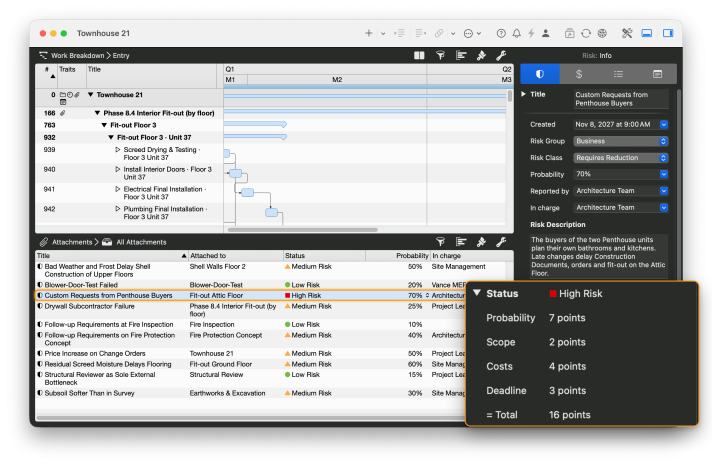
How Merlin's risk points come about
The inspector breaks down the status: 7 points for 70 percent probability, plus 2 for scope, 4 for cost and 3 for the deadline. With 16 points, the custom requests are above the threshold of 15 and count as a high risk.
Try the Prompt Yourself
Read all open risks in the current project with probability, the three
impacts, points and status. For each risk, also calculate the product
of probability and largest impact, and show both rankings side by side.
Then check each probability against the project history: are there
risks or issues that already occurred in the same project and suggest
a higher probability?
Calculator: Your Risk Matrix
For a quick classification, the calculator uses the same matrix as our sample project. It asks in three steps for the risk, its probability and its largest impact. The result names the level, the response and the matching risk class for Merlin Project. Each risk appears as a numbered dot in its cell. Export the matrix with the list as an image for your weekly meeting or as a CSV for your register.
Your risk matrix
Which risk do you want to classify?
How likely is it to occur?
How big is the impact on costs, schedule or quality?
Quantify Risks: From Status to Number
Quantitative assessment replaces levels with quantities, and with them you put a figure on how much contingency your project needs. The simplest step is the expected value: probability times impact in days or dollars. A risk with 70 percent and an impact of 15 working days has an expected value of 10.5 working days. The sum of the expected values is a first reference point for the risk contingency. For schedules, it falls short because it ignores the network: a delay off the critical path only consumes slack, while two risks on converging strands have a stronger effect than their sum. Only a Monte Carlo simulation calculates this correctly, with each risk attached to its task as an event with its probability. DeMarco and Lister call the earliest conceivable date, which only holds if nothing goes wrong, the "nano-percent date". The simulation shows how far your planned date is from it.
The risk attachment in Merlin Project holds probability and qualitative impact, but no impact in days or dollars for open risks. Add two custom fields to the task for this, or write the expected impact into the Risk Description. Reserve the Cost and Delay fields for risks that have occurred; Merlin does not include them in the plan or budget. Model a risk contingency as a separate buffer task before the end date. The AI runs the simulation from plan and register, as shown in the article Monte Carlo simulation in Merlin Project.
In Our Sample Project
The expected value ranks risks by their importance for the schedule: the buyers' custom requests weigh almost twice as much as screed moisture in second place. That is where the first response comes in: a cutoff date for custom requests in the purchase contract costs one contract clause and protects ten working days of expected value. The article on scope creep describes how to contain such changes. The two fire inspection rows also show how much a miscalibrated probability distorts the contingency. Their impact of 8 working days comes from the fire protection follow-up requirements in the same project. Set the probability to the 40 percent of that occurred risk, and the expected value quadruples.
Try the Prompt Yourself
Read the open risks in the current project and the task each one is
attached to. I will give you a typical impact in working days for each
risk from our knowledge base. Simulate 10,000 project runs in which each
risk occurs with its probability and extends its task. Show the end date
for P50, P80 and P90 with and without risks, and name the three risks
with the greatest influence on P80.
3. Control Risks: Strategies and Risk Classes
The PMBOK Guide (6th edition) names five responses to threats. Escalate if the risk lies outside the project's authority. Avoid by changing the plan so that the risk disappears, for example by moving the shell construction out of winter. Transfer by having someone else bear the consequences, through insurance, a contractual penalty or a fixed-price contract. Mitigate by reducing probability or impact, for example with a cutoff date for custom requests. Accept, actively with a contingency plan and contingency reserve, or passively without any precaution. For opportunities there are mirror images: exploit, share, enhance, accept. Once it is clear for every important risk what happens, who acts and by when, the team carries out the prepared plan in an emergency without debating first.
In Merlin Project, the Risk Class has three values: Requires Reduction, Requires Emergency Plan and Accepted. Write the specific response in the Actions field and the responsible person in In Charge. Responses that cost work or time also belong in the plan as a task, such as "Excavation acceptance by the surveyor" or "CM moisture test before flooring starts". Only then do they have a date, a resource and costs, and the AI can see whether they are done.
In Our Sample Project
Is the risk outside your authority, or can someone else bear the consequences better?
Transfer and escalate
Insurance, contract, steering committee
In Merlin Fields Actions, In Charge
No, continue
Can you reduce probability or impact at a reasonable cost?
Avoid and mitigate
Change the plan, reduce probability or impact
In Merlin Requires Reduction
No, continue
Would the impact be large if the risk occurred?
Accept actively
Prepare a contingency plan and reserve
In Merlin Requires Emergency Plan
Accept passively
Bear the risk deliberately, only observe
In Merlin Accepted
A risk class without an action is a declaration of intent. In our sample project, nine of ten risks have an action and a person in charge. The tenth, the fire inspection, is set to "Accepted" with no action and nobody in charge. You may accept risks passively if their impact is small or if no economical response exists. Neither applies to a fire inspection on the way to acceptance, with a reviewer who has already raised follow-up requirements in the same project. The obvious response is already in the Lessons Learned of the fire protection risk: involve the certified reviewer early.
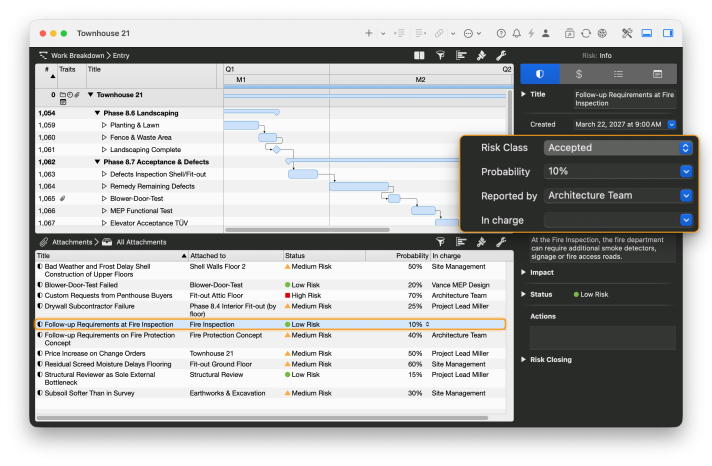
The risk register in Merlin Project
The plan at the top, all ten risks of the sample project below, the inspector on the right. For the selected fire inspection, the risk class is set to Accepted, and the Actions and In Charge fields are empty.
Try the Prompt Yourself
Check all open risks in the current project for how they are controlled.
List risks without an action or without a person in charge. Check
whether the risk class matches the assessment: risks with status medium
or high that are set to Accepted, and risks set to Requires Emergency
Plan whose action does not describe an emergency plan. For each gap,
suggest a specific response and say whether it belongs in the plan as a
separate task.
4. Monitor Risks: Register Against Plan
Most risks announce themselves. Early warning indicators make this measurable: a missed start, a postponed delivery date, slack that shrinks faster than planned. These signals are in the plan, on the tasks the risks are attached to. Monitoring therefore means comparing register and plan regularly. By hand, that takes hours with hundreds of tasks and dozens of risks, so people tend to put it off until the next risk workshop. An AI with access to both does it with one query, and risks that have occurred stand out as soon as the plan shows them.
In Merlin Project, every risk is attached to a task, and the task carries planned, expected and actual values. Set a status date in the project settings, and Merlin shows for each task whether it is on schedule. For the weekly status meeting, group the Attachments view by Status or Did Occur.
In Our Sample Project
What the plan shows and the register does not
Shell walls and slab on floor 2, late November to late December
Plan and actualWorking days
13 WD later
RegisterRisk no. 3
Contradiction
As long as the risk is not marked as occurred, nobody in the ongoing project reacts. If frost has already slowed the shell construction of the upper floors, it also threatens the following exterior work, and the action "Commission winter construction measures" comes too late. On top of that, the contradiction distorts the knowledge base: a risk that nobody marks as occurred counts there as one that did not happen, and the next register starts with a probability that is too low.
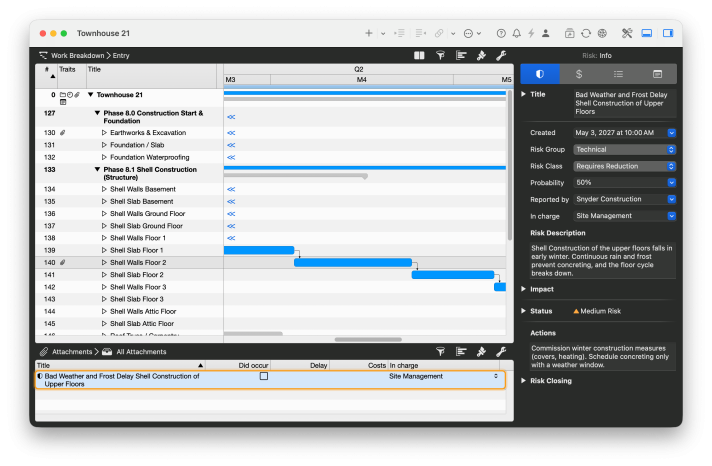
Register and plan in the same window
The shell walls on floor 2 are selected; below, only the risk attached to this task appears. The Did Occur column has no check mark, although the task took more than twice as long as planned.
Try the Prompt Yourself
Compare the risk register in the current project with the plan. For
each risk set to not occurred, check the task it is attached to and its
neighbors: is there a delay, extra work or a postponed start that
matches the risk description? For each match, name the risk, the task,
the planned and actual values and your reasoning. List matches on the
critical path first.
Report Risks: One Page for the Steering Committee
A risk report for decision makers answers three questions: Which risks threaten the project objectives most? What has changed since the last report? Which decision do we need? Everything else belongs in the register, not in the report. The limit of usually five risks forces you to prioritize; that is where the report's value lies, and the steering committee spends its time on decisions. The article on communication in project management covers how to explain risks clearly to decision makers.
In Merlin Project, filter the Attachments view to risks with status medium or high and sort by Points. The AI writes the report text from register and plan in a few minutes; you attach the register itself using the reports in Merlin Project.
In Our Sample Project
The report starts with the three risks with the most points: the custom requests from the penthouse buyers (16, high), residual screed moisture (13) and the price increase on change orders (12). The decision the steering committee has to make concerns the custom requests: only the investor, as the seller, can set a cutoff date in the purchase contract. As a change since the last report, the shell construction on floor 2 belongs in it, with 13 working days of delay on a risk that the register still lists as not occurred.
Try the Prompt Yourself
Create a risk report for the steering committee from the current
project, one page at most. Name the five most important open risks by
points and by position on the critical path, each with status, action,
person in charge and the decision we need. List risks that have
occurred since the last status date with cost and delay. Write
factually, without jargon, in full sentences.
5. Close Risks: Back into the Knowledge Base
A risk ends when it occurs or when its time window closes. Both are knowledge. Risks that occurred show the actual impact and whether the response helped; every risk that did not occur is a data point for the probability. This way every project leaves calibrated values for the next one, and your register becomes more accurate from project to project. The guide to the project knowledge base describes how to condense these data points across many projects.
In Merlin Project, set Did Occur for every risk that has occurred and enter Cost, Delay and Lessons Learned. For risks whose time window has passed, note in the Lessons Learned whether the response worked. Make this a fixed part of project closeout, ideally as a checklist on the "Project Closeout" milestone.
In Our Sample Project
Two risks are properly closed. The soft subsoil cost $20,400 and 2 working days; from now on, the firm plans the excavation acceptance as a separate task and always tenders soil replacement as a contingency item so the price is fixed before construction starts. The follow-up requirements on the fire protection concept cost $7,200 and 8 working days, and from now on the certified reviewer joins as early as design development. You can use both entries directly in the next project, with impact, response and scope of application.
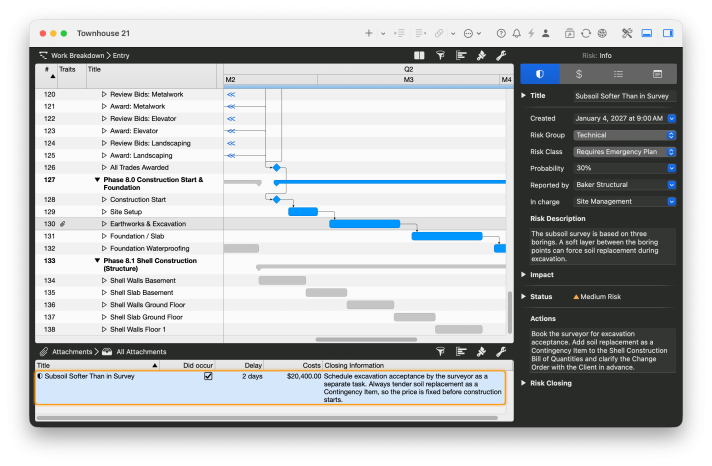
A closed risk
For the subsoil, Did Occur is checked, and delay and cost are filled in. The Closing Information column names the response for the next project.
Try the Prompt Yourself
The current project is complete. Read all risks and check whether Did
Occur, Cost, Delay and Lessons Learned are filled in. Compare risks that
did not occur with the actual values of their tasks and name cases that
should have occurred according to the plan. Summarize the maintained
risks as entries for our risk catalog: risk, applies to, impact, proven
response.
Limits
An AI speeds up risk management. It does not get any smarter than the register and archive it reads from.
- No invented probabilities. The AI calculates with the values from the register and the knowledge base. If they are missing, it can suggest assumptions, but the decision stays with you. Have it list every assumption.
- Unknown unknowns stay unknown. The AI only checks risks that someone has recorded. Everything else is what the management reserve is for.
- Read-only access. The Merlin Project MCP server currently only reads. You enter new risks, changed assessments and responses yourself.
- Privacy. With cloud clients such as Claude, the queried plan data goes to the provider. If you want to avoid this, use a local model on your own Mac.
Risk management remains project management for adults. The AI takes over the tedious comparison of register and plan; the decisions are yours.
If you have any questions about this blog article or would like to discuss it, we look forward to your contribution in our forum.
Frequently asked questions
How does Merlin Project calculate the status of a risk?
Merlin awards 0 to 10 points for probability and up to 5 points each for the impact on cost, scope and deadline, and adds the values. Up to 7 points, a risk counts as low, up to 14 as medium, from 15 as high.
What risk categories are there?
The usual classification is by source: technical, financial, personnel, business and external. You can also sort risks by impact (schedule, cost, scope), by type of uncertainty (variation, event, rework) and by direction (threat or opportunity). Merlin Project comes with five risk groups; you create your own under Value Lists.
What is the difference between a risk and an issue?
A risk describes a possible event; once it occurs, it becomes an issue. In Merlin Project, you record each as a separate attachment type; you mark a risk that has occurred with Did Occur and enter its cost and delay.
What strategies are there for responding to risks?
For threats, the PMBOK Guide names escalate, avoid, transfer, mitigate and accept. In Merlin Project, the risk classes Requires Reduction, Requires Emergency Plan and Accepted represent these strategies; the specific response goes in the Actions field.
Can the AI create risks in Merlin Project via the MCP server?
No. The MCP server currently only reads. The AI checks the register against the plan, suggests risks and responses and writes reports; you enter them in Merlin yourself.