

Microsoft is discontinuing Project Online on September 30, 2026. Many teams that built their schedule and portfolio planning on it for years now face the question: where to now? Microsoft's successors rely on the cloud and on Windows; a native Mac solution is missing. This article puts the end-of-life in context and presents Merlin Project as an alternative that combines real scheduling and modern collaboration, natively on the Mac.
What Exactly Is Ending
Microsoft is gradually withdrawing from Project Online. The key milestones:
- October 1, 2025: Sales stop. Project Online is no longer available to new customers.
- April 1, 2026: No new Project Web App sites can be created.
- September 30, 2026: End-of-life. The service is discontinued.
As successors, Microsoft names the new Planner (based on Project for the web) for cloud users, the Project Server Subscription Edition for on-premise scenarios and the classic desktop client Project 2024. On paper, there is something for everyone. In practice, none of these paths fits all.
Why the Switch Leaves Many Uncertain
The cloud-based Planner does offer schedule planning with dependencies and baselines. Advanced capacity and cost planning as well as the bundled desktop client remain Windows-centric, however. For Mac teams that means: only the web experience. And Microsoft Project has never offered a native Mac version.
In the project management community, the uncertainty shows clearly. Many do not want a simplified task tool, but real project management:
"Modern work management tools like Asana or Monday are not an option. They are not for serious project management." (paraphrased, from the project management community on Reddit)
"I'm looking for something that respects clean scheduling, dependencies and portfolio views, without turning everything into cards and emojis." (paraphrased, from the project management community on Reddit)
On top of that come the well-known friction points of the desktop client when working on a file together:
"It is very annoying when several project managers work in the same file. No auto-save, and occasionally the file crashes." (paraphrased, from the project management community on Reddit)
The result is a palpable homelessness. In the most-watched migration thread, one user sums it up:
"We don't even have anything to replace it with." (paraphrased, from the project management community on Reddit)
Merlin Project: The Native Alternative
Merlin Project is a native project management app for Mac, iPad and iPhone. It comes with real scheduling, from the critical path through baselines and resource leveling to Earned Value, works offline too and keeps your project data in your hands. Via MagicSync several people work on the same file, without conflict copies and without a central server. Exactly the three points where the Microsoft paths leave Mac teams in the lurch: native Apple software, offline capability and conflict-free collaboration.
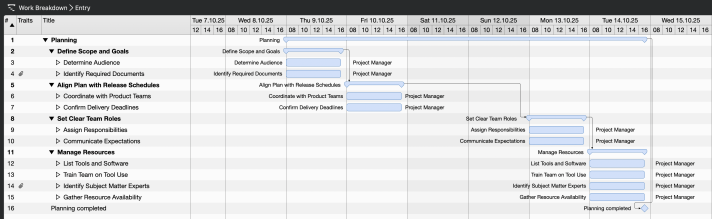
Real scheduling, natively on the Mac
In the Gantt chart you drag dependencies as connecting lines, the critical path is marked automatically, and baselines show the deviation from the target. Unlike with Project, you get this natively on Mac and iPad, offline too.
The Full Feature Comparison
How Merlin Project and Microsoft's web project planning (Project Plan 3) stack up point by point on planning and Gantt, resource management, cost tracking, multi-project management and platform is shown in our detailed comparison of Merlin Project vs. Microsoft Project Plan 3, with screenshots of both tools.
If the move means new hardware anyway, it pays to look at the TCO comparison Apple versus Windows first: it weighs purchase, IT support, residual value and licenses against each other over your planned period of use.
The Switch Is Easier Than You Think
Your existing plans are not lost. Merlin Project imports MS Project files in XML format directly, so you carry over your structures, tasks and dependencies instead of starting from scratch. You can find a step-by-step guide in our post on transferring data from MS Project.
The end-of-life of Project Online is a good reason to reconsider your own choice of tools. If your team needs real project management, values modern collaboration and does not want to be tied to Windows, Merlin Project is worth a try. You can try Merlin Project free for 30 days.
