Glossary
Swimlanes
Kanban swimlanes, expedite lane
Swimlanes are horizontal rows that divide a Kanban board across its status columns. Each row groups one kind of card, such as a team, a project or a priority. One board then shows both where the work stands and which stream it belongs to.
The columns of a Kanban board show status, for example "To Do", "In Progress", "Review" and "Done". Swimlanes add a second axis on top. Every card sits in a cell defined by status and lane.

Which Swimlanes Are Common?
| Swimlane type | Lanes in the example | What it is good for |
|---|---|---|
| Expedite lane | Expedite, Standard | Urgent work (such as a production bug) overtakes every other card. The team pulls it first. |
| By class of service | Expedite, Fixed Date, Standard, Intangible | The Kanban Method sorts work by urgency and cost of delay. Each class follows its own rules. |
| By team or person | Design, Development, Content | Several teams share one board; each sees its own row. |
| By project | Website relaunch, Trade show, Newsletter | One team works on several projects in parallel. |
| By priority | High, Medium, Low | The team clears the top lane first. |
Example: a marketing team splits its board into the lanes "Expedite", "Website relaunch" and "Trade show". When the screen at the trade show booth fails, the card goes into "Expedite" and overtakes everything else. At the same time, the project lanes show five relaunch cards waiting in "Review" and none from the trade show: the bottleneck sits in the relaunch.
The six Kanban core practices explain columns, pull and WIP limits in more detail.
Swimlane Diagram or Kanban Swimlane?
Two disciplines use the word "swimlane". A swimlane diagram from process modeling, for example in BPMN with pools and lanes, assigns each step of a process to the role or department that performs it. It describes a recurring flow. A Kanban swimlane sorts concrete work cards and shows their current status. The diagram answers "Who does which step?", the board answers "Where does this task stand right now?".
Common Mistakes with Swimlanes
- Too many lanes: As a rule of thumb, beyond about five rows the board no longer fits on one screen, and empty cells take over.
- Lanes without a rule: Define when a card may enter the expedite lane. Otherwise every other card ends up there.
- Lanes as a substitute for status: Status belongs in the columns. A "Blocked" lane hides the step where the card is stuck.
How Do You Set Up Swimlanes in Merlin Project?
In Merlin Project, open the board with View › Net Plan › Kanban. The status field forms the columns; the swimlanes come from a grouping with two fields:
-
Click the Groupings icon in the function bar (or choose View › Groupings).

-
Click the magnifying glass next to the active grouping and add a second level with + (then by).
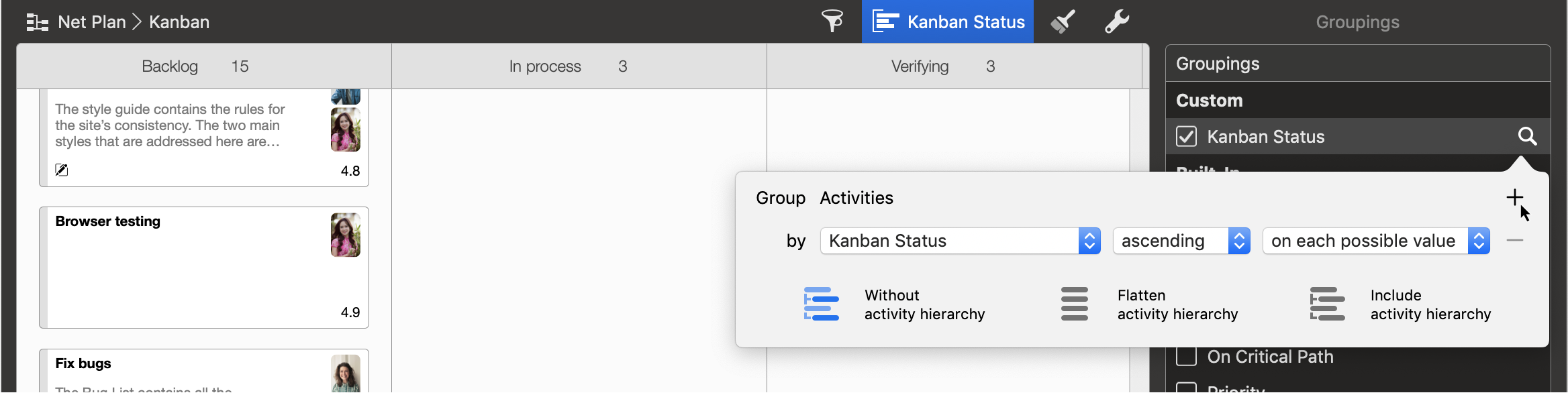
-
Choose the field that should form the lanes, such as priority, resources or tags.


In the View Options, use Swimlane to set whether Merlin Project separates the groups of the second field Horizontal or Vertical.
You limit the number of cards per column separately. Select the header of a Kanban column, which is the group of a status value. The Inspector then shows the Grouping page; under Number of Cards, enter a Minimum Count and a Maximum Count. If a column holds too many cards, Merlin Project reports a strong conflict; if it holds too few, a weak one. The guide Kanban with priorities in Merlin Project shows how to sort the board by priority.